Thursday, October 22, 2009

Windows 7 Lauch Party - Free 1 year Kaspersky and Panda Internet Security

As you know, The Windows 7 launch is October 22, 2009. You’re making an investment in updating your operating system, this says some things about you: you’re smart, computer savvy and interested in staying up-to-date. But due to your recent purchase, your wallet might consequently be a little lighter, too.
Windows 7 Lauch Party - Free 1 year Kaspersky and Panda Internet Security
ON 22 Oct 2009, You can download and use Kaspersky Internet Security and Panda Internet Security 1 year for FREE!
With Kaspersky Internet Security: http://usa.kaspersky.com/shakeitup/


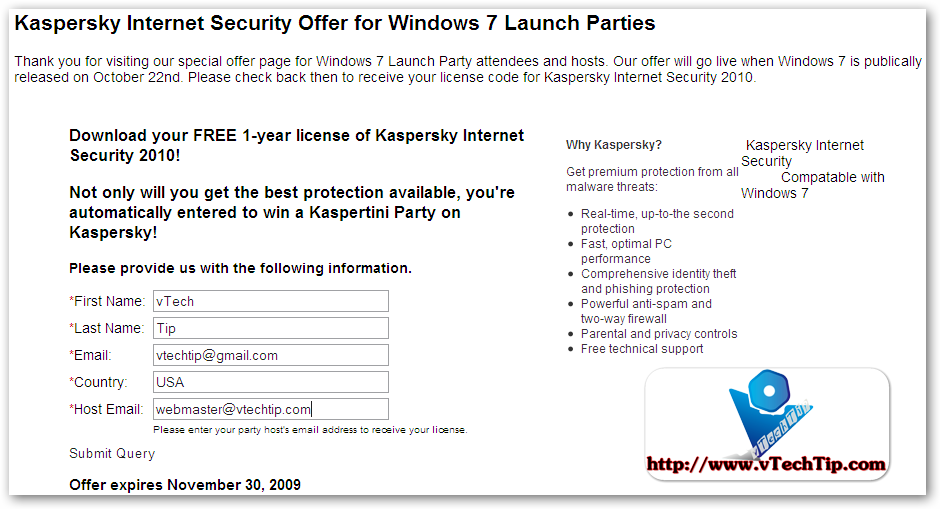
Kaspersky Internet Security Offer for Windows 7 Launch Parties

Thank you for visiting our special offer page for Windows 7 Launch Party attendees and hosts. Our offer will go live when Windows 7 is publically released on October 22nd. Please check back then to receive your license code for Kaspersky Internet Security 2010.
Fastest growing Internet Security Software

About Panda Internet Security: click this link: http://us.pandasecurity.com/w7launch/

Not to worry! Everyone remotely related to the tech industry is taking advantage of this marketable launch party by giving away free stuff. Not that we can blame them—we are too. But our stuff is free-er than free: Panda Security is the free-er-est of them all.
October 22, 2009 is the magical 24 hour period when ordinarily pricey things turn into free things. Well, Panda Security is now compatible with Windows 7, so why not pair the two? Register on this glorious day for ONE FREE YEAR of Panda Security’s anti-virus protection. Prevent viruses, malware, Trojans, worms, identity theft, online banking and other threats from infecting your PC. Internet Security is ultra light-weight because it’s using “cloud” technology so it won’t hinder your computer from operating as freely as it can. Because the only free thing we can think of that isn’t good is a computer virus.
Follow these easy steps to free your computer of viruses, hackers and other
cyber-criminals:
1) Register here on 10/22/09
2) Download Internet Security 2010 from our Web site
3) Receive an activation code for one free year and use it
4) Run Internet Security and instantly begin protecting your PC from all the cyber junk that will make fixing your computer the opposite of free!
What makes Panda the Free-er-est of them all?
Free is good. Free is what the people crave. It’s been a proven fact that free-er things are even better than free things because they have reached an elevated level of cost-lacking. Some free-er things have greatly helped the progress of the world and the general well-being of humankind, such as Panda Security’s Internet Security. It frees your computer of viruses, hackers, worms, Trojans, phishing, identity theft and online banking fraud and offers 2 GB of free online space to back up files. Internet Security also offers a Parental Control so that children are not exposed to harmful Web content. Automatic updates, instant protection, easy management; you can’t get any free-er than that. And Panda Security it simply the free-er-est.
For instance, some notable free-er things:

Free T-shirts – though we really don’t need or want them, we can never turn them down.
Statue of Liberty – free-er because it came from the French.
Freebird – no explanation required for this display of musical genius.
Free Drinks – best when coupled with limited implications.
Free Parking – city slickers understand how much free-er this rare treat is than cabbing it.
Get Out of Jail Free – would be free-er if applicable to modern day society, but oh well.
Freedom Fries- because of the haphazard attempt at rebranding a carb-loaded snack that we were all fine with in the first place and the ensuing hilarity of the attempt.
Freedom of Speech – without which, would we have this awesome promotion? I think not.
Free refills – The people need what the people want, and that want is drinking more liquids.
Free Range Chicken and Beef – Because animals have rights too.
Sugar-free- Because diabetes affects millions of people.

UPDATE: PANDA INTERNET SECURITY NOW LAUCH! Image:
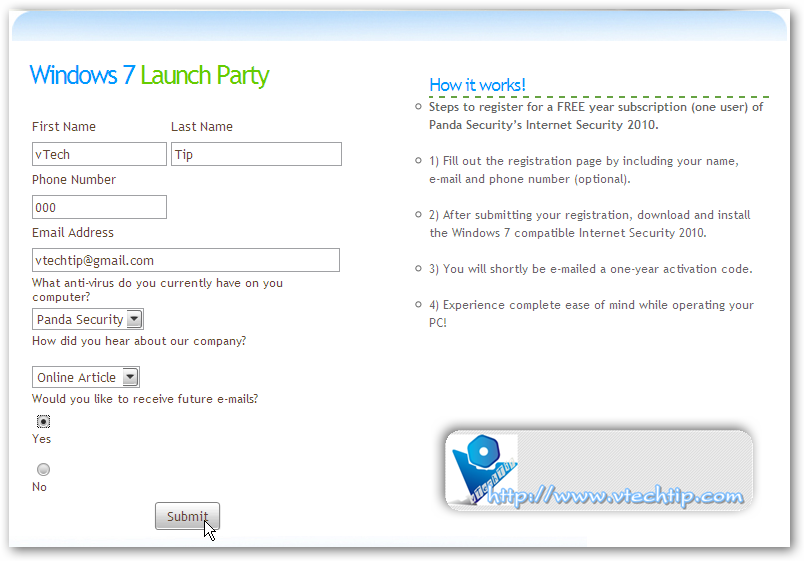
PANDA LAUCH! Windows 7 Lauch Party - Free 1 year Kaspersky and Panda Internet Security
Note: this offer is only valid to U.S. residents only. But you can use proxy to get it. Exp: use Hide My Ass service.


AND NOW, KASPERSKY've already LAUCNCHED!!!
PANDA LAUCH! Windows 7 Lauch Party - Free 1 year Kaspersky and Panda Internet Security

Wednesday, October 21, 2009

15 Effective Tips to Increase Google Adsense CTR

    How to make more money with Google Adsense? Get more clicks on ads. We all want to increase Google Adsense CTR i.e. click through ratio, because the higher times the surfer clicks the Adsense ad, higher is the payout to you. So here are 15 effective ways to improve your Adsense CTR.


    You can see:


  • Which Adsense ads format is the best?

  • New Ideas of Adsense Placement - New ways to earn more with Adsense


  • How to increase Google Adsense CTR?

    • Post Adsense ads them on text rich pages and make sure that Adsense had a bunch of keywords to work with. Getting Higher paying keywords is better of course.
    • Get rid of public service ads, which pay you nothing for your efforts. Here are some ways to avoid getting PSA’s.
    • Avoid titles like the approved ‘Sponsored Links’ and ‘Advertisements’ above the Adsense ads. Why do you want to tell the world they are ads when google already puts ‘Ads by Gooooogle’ with them. These two terms are the only ones allowed by Google TOS. Any other terms will get your account terminated. Remember to avoid these 15 Adsense mistakes.
    • Use section targeting - you can target an ad unit to a specific section of your blog, as well as block out irrelevant sections like navigational links. Useful to get more targeted ads.

    What is the best Google Adsense Placement for CTR?

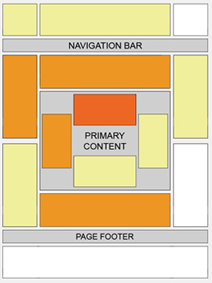
    • Place Ads above the fold, i.e. you dont have to scroll down to see the ads. Moreover it loads before your entire page does. The more the visibility, the more chances a reader will click the ad.
      Best Placement for Google Adsense
    • Provide some free space around ads so that they stand out and users know where to find them. Dont clutter up the ads inside your content.
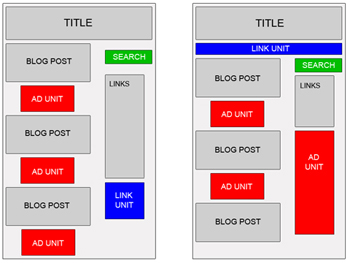
    • Experiment by changing the location of advertisements. Track them by channels to see which location works. Sometimes unusual locations can can do wonders for your CTR. Google Adsense support provides some good ideas for better blending
      Google Adsense Placement
    • Many experienced Adsense users have reported better CTR with vertical ads rather than the horizontal ones. But that really depends on your site structure.
    • Usually it is recommended to place towers on your right, as users tend to use the mouse to scroll the bar on the right side wiht a higher chance to see your ads. Some have reported doubling CTR’s by placing towers to the left rather than the right, as people have got bored of seeing ads on the right, it has something to do with the sidedness of the brain which I do not understand and there is a tendency to read from left to the right.
    • Many sites will have small ads in the top right hand corner, as they claim it is the first place where the eye sees.
    • An excellent article on Eyetracking - What We Saw When We Looked Through Their Eyes helps to tell you where users actually see first and in what order.
    • Forums are tricky becasue they have a different kind of navigation, readership and participation. Here are some ad placements suggested by Google which work best for forums
      Google Adsense for Forums

    Best Google Adsense Link Colors to get higher CTR?

    • Match the colors of your ads with the colour scheme of your site. Blending with your sites color profile helps to identify them not as ads, but as links similar to those of your site. The more the AdSense looks like part of your site, the higher CTR you will get. You can also match the Adsense fonts with your website font design for great results.
    • Blend ads with your page - remove the borders by having a similar color as your background helps to show ads as being part of your site. Do not blend text or the ‘Ads by Gooooogle’ with your background color as it is against Google TOS (Google does not like hidden text!). However, such blending may not work for you always due to banner blindness. Neither do they see the ads, not do they click on them. So sometimes a bold contrasting ad may work better depending on your website design.
    • Experiment by changing the colors, background of advertisements. You have to find out what works best for your site, not others. You can also rotate Adsense colors to reduce ad blindness.
    I hope these tips help to get your Adsense CTR up by at least 100% if not more. Good luck and make more money!

    Via: QuickOnlineTips

    Tuesday, October 20, 2009

    Which Adsense ads format is the best?

        Which Adsense ads format is the best?
        I entered the width and height for every available format of text/image ad unit, and then calculated the area and aspect ratio for each. The results are shown below, sorted descending by greatest advert area:

    Which Adsense ad format is the best?
    Name Width Height Area Aspect Ratio
    Wide Skyscraper 160 600 96000 3.75
    Large Rectangle 336 280 94080 1.20
    Medium Rectangle 300 250 75000 1.20
    Skyscraper 120 600 72000 5.00
    Leaderboard 728 90 65520 8.09
    Square 250 250 62500 1.00
    Small Square 200 200 40000 1.00
    Vertical Banner 120 240 28800 2.00
    Banner 468 60 28080 7.80
    Small Rectangle 180 150 27000 1.20
    Button 125 125 15625 1.00
    Half Banner 234 60 14040 3.90

         Note that Google say that the three best-performing ad units are the Large Rectangle, Medium Rectangle, and Wide Skyscraper. Well, these are precisely the top three in this list.

        So, it looks as though ads that cover a large area on the page get the most clicks. This is, of course, intuitively sensible. However, I wonder if the trend continues down the list; this would make Half Banner the worst format available.

    • And, you will choose which size of ads for your website?

    New Ideas of Adsense Placement - New ways to earn more with Adsense

    Adsense Placement is always researched and tested to find out the best place for Webmaster and Visitor. Most of Webmaster followed Google Adsense Guides to put adsense on their website. And most of them are right.
    According to Google:
    While this heat map is useful as a positioning guideline, we strongly recommend putting your users first when deciding on ad location. Think about their behavior on different pages, and what will be most useful and visible to them. You'll find that the most optimal ad position isn't always what you expect on certain pages.
    For example, on pages where users are typically focused on reading an article, ads placed directly below the end of the editorial content tend to perform very well. It's almost as if users finish reading and ask themselves, "What can I do next?" Precisely targeted ads can answer that question for them.

    New Ideas of Adsense Placement - New way to earn more with Adsense
    But, I have 2 new ideas, ONLY my thought, and I think they're right, you can try to test these:
    1/ Put Adsense in Left Sidebar or Right Sidebar: with Google, left is better right. But, let's think!
    - When visitors browse your site, they will look thing which are on the left side, TOP LEFT side, that is the FIRST thing people see (Based on Golden Triangle Google). HOWEVER, they just only SCAN it, SCAN it and forget it.
    - And when an ads appears on the right sidebar, in the first time, they almost won't realize it, it, but when you can make it appear “differently” with the rest, that means, after scan the page, they will notice that ads, and they not just scan, they “read” the ads, and they will easily more click the ads,…
    Of course, you must choose Adsense format fits with your template, let see Which Adsense ads format is the best? for more informations.
    That's just a little tips, but I found it work well for me and my friends.

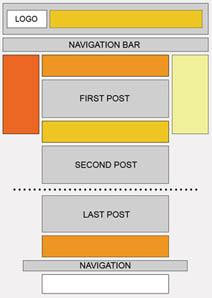
    Example for right sidebar Ads:
    New Ideas of Adsense Placement - New ways to earn more with Adsense
    Please read 15 Effective Tips to Increase Google Adsense CTR for more informations.
    2/ Should you put ads in first page (Home page)? I found that it is better not to put ads in index page! Why?
    Almost Webmasters think that putting ads as much as possible is better for get more clicks. But you think, if visitors come to your site with main keyword, and although first page has lot of contents, they maybe click on ads and leave your site. Maybe leave FOREVER, if they find ads page is helpful, and they will forget your site.
    If the first page has not any ads, just content, they just read the content, and visit second, third pages to read more. They will "notice" more with ads, and they maybe "read" ads, not "scan", and if they click on ads, they still remember your site to come back.

    Alright? Not believe? Just try it! So you just need to decide, which side is good for you. You can try to change the ads position for several days and check the difference. For the combination of left and right positions for ads, I think a lense page in Squidoo.com did it well.

    Monday, October 19, 2009

    10 CPM Ad Networks for you

    1. YesAdvertising
      • Types of CPM avaible: Pop-Under, In Page Banner, Pop-In Banner.
      • Ways of getting paid: Check, Paypal, Wire Transfer.
      • How often they pay: Twice a month ( 1st and 15th )
      • Minimum: 100$

    2. CreditBurner
      • Types of CPM avaible: In Page Banner, Pop-Under, Pop-In Banner, Context Links, Treasures.
      • Ways of getting paid: Paypal, E-Gold.
      • How often they pay: Every 2 Weeks ( Friday mostly )
      • Minimum: 2.50$
      10 CPM Ad Networks for you

    3. PopupTraffic
      • Types of CPM avaible: Pop-Under
      • Ways of getting paid: Check, Paypal
      • How often they pay: Twice a month
      • Minimum: 25$

    4. Clicksor
      • Types of CPM avaible: Inline text Links, Text Banners, Graphical banners, Popunder, XML feeds, Layer Ads, Inter-ads
      • Ways of getting paid: Check, Paypal
      • How often they pay: Twice a month ( 1st and 15th )
      • Minimum: 50$

    5. FreedomOfAds
      • Types of CPM avaible: Pop-Under, In Page Banner
      • Ways of getting paid: Paypal, MoneyBookers, Check, Wire Transfer
      • How often they pay: Monthly
      • Minimum: 10$(MB, Paypal), 50$(Check), 500$(Wire)

    6. AdsDaq
      • Types of CPM avaible: In Page Banner, text links
      • Ways of getting paid: Check
      • How often they pay: Monthly
      • Minimum: 50$

    7. InterClick
      • Types of CPM avaible: In Page Banner
      • Ways of getting paid: Paypal
      • How often they pay: NET-45
      • Minimum: 100$

    8. TribalFusion
      • Types of CPM avaible: Popups, In Page Banner
      • Ways of getting paid: Check
      • How often they pay: NET-45
      • Minimum: 50$

    9. BurstMedia
      • Types of CPM avaible: Popups, In Page Banner
      • Ways of getting paid: Check, Paypal, electronic transfer
      • How often they pay: NET-15
      • Minimum: 50$

    10. RealTechNetwork
      • Types of CPM avaible: Popups, In Page Banner
      • Ways of getting paid: Check, Paypal, ACH Direct Deposit, Bank Wire
      • How often they pay: NET-20
      • Minimum: 20$

    Paragon Partition Manager 9.5 Professional Give Away for Free

         Few days ago, Paragon Software Group gave away Paragon Partition Manager 9.5 Professtional for free. Though this Paragon's give away only available on 14 Oct 2009 to 18 Oct 2009, but you can still download and use it today and maybe some next days. Of course download links did not appear in give away site from yesterday, but you can download with these link (from server of Paragon Software Group), about more than 100 MB:

         And then register Free Serial key at here. You will receive license information for the software within the next 15 minutes from eservice@paragon-software.com. If you do not receive a confirmation email from us, please check your spam, bulk or junk mail folders. If you find the email there, your ISP or your own software spam-blocker or filters are diverting our e-mail.
         Or you can try to use my key:
    PRODUCT KEY:   pm95pro-free-1547273
    SERIAL NUMBER: 07120-F0590-8FD14-57CC5


    Paragon Partition Manager 9.5 Professional Give Away for Free

    Main funtions of Paragon Partition Manager:


    Advanced Partitioning Operations

    Enlarge NTFS partitions without rebooting Windows or interrupting your work, repartition hard disks without data loss, redistribute free space between partitions, merge two partitions to one etc.
    Manage Vista/XP or Vista/Windows 7 on one PC!
    Run several versions of Windows on your computer and switch between them easily upon startup. The Install New OS Wizard helps you to set up multiple operating systems on the same disk, e. g. Windows Vista and the new Windows 7.
    Apple® BootCamp Support
    Redistribute unused space between Mac® OS X and Windows partitions.
    Recovery environment on a USB flash drive
    Create WinPE/Linux/DOS bootable media on a USB flash drive for fast, reliable maintenance and recovery operations.
    Improved two level user interface
    A refined user interface with two experience levels (Easy/Advanced) will satisfy the needs of every customer.
    Bulletproof protection against hardware malfunction
    Safe defragmentation of your hard disks even in the case of power outages, hardware malfunctions or system failures, easy backup creation and recovery media ensure the safety of your computer system.
    Optimization and Defragmentation
    Tune your system for maximum performance! Defragmentation is the best method for achieving fast and smooth system performance. It accelerates system startup and when launching programs. Keep your system performing like when it was first installed!
    Simple System Backups and Restoration

    Fast and easy backup creation to CDs, DVDs and even Blu-ray discs with the Simple Backup Wizard. Back up your system and data safely and easily before performing critical partitioning operations.
    With the help of the Recovery CD you can use Partition Manager to access your files even when your machine cannot boot. Restore your system and data from previously created backup archives when your system fails.


    Paragon Partition Manager 9.5 Professional Give Away for Free


         Up-to-date, Paragon Partition Manager is version 10 now. If you want to try newest version, you can read more informations at here. Price of it is $79.95. Personal version is sold with $39.95.

    Sunday, October 18, 2009

    AeroSnap and AeroShake for XP and Vista with TrueTransparency 1.2

    TrueTransparency was well-know as the best software to make XP windows and border transparent as Windows Vista.

    TrueTransparency is so easy to use, just start it and enjoy! It uses a small of RAM, only about 1 - 5 MB or event less.

    This True Transparency of vTechTip was included total 30 skins from over network. You can change by right-click at system tray icon and choose Skins > Skin name.

    In this 1.2 version, you can use AeroSnap and AeroShake of Windows in currently version of Windows (including XP and Vista). To know how these 2 funtions work, just see video.
    AeroSnap and AeroShake for XP and Vista with TrueTransparency 1.2
    Video Tutorials: