Showing posts with label Google Adsense. Show all posts

Wednesday, November 11, 2009

9 Google Adsense Placement Recipes

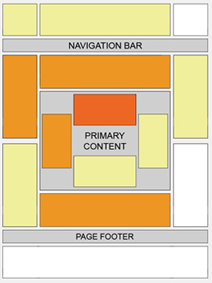
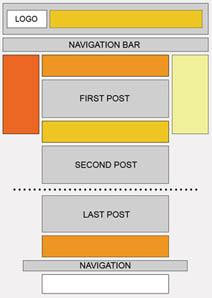
    Although placement of Google Adsense is base on personal idea, but you still need a recipe to put it alright and do not against Adsense TOS. At fisrt, you must choose the suitable size for each element of website, please follow this: Which Adsense ads format is the best?. And then, you can choose location of them, ex: New Ideas of Adsense Placement - New ways to earn more with Adsense. So that, you can get the best CTR for you site (read more 15 Effective Tips to Increase Google Adsense CTR).

    And there is 9 recipes:
  1. ABOVE THE FOLD, BELOW THE TITLE
    Ingredients:


    • 1 Medium Rectangle (300 x 250) Text Ads or 1 Square (250 x 250) Text Ads or 1 Large Rectangle (336 x 280) Text Ads or Banner (468 x 60) Text Ads
    How:


    • Place one of the above Google Adsense Ads at the beginning of your article, just right below the title.


  2. AT THE END OF AN ARTICLE
    Ingredients:


    • 1 Medium Rectangle (300 x 250) Text Ads or 1 Square (250 x 250) Text Ads or 1 Large Rectangle (336 x 280) Text Ads or Banner (468 x 60) Text Ads
    How:


    • Place one of the above Google Adsense Ads at the end of your article.


  3. NEXT TO AN IMAGE
    Ingredients:


    • 1 Medium Rectangle (300 x 250) Text Ads or 1 Square (250 x 250) Text Ads or 1 Large Rectangle (336 x 280) Text Ads,
    • 1 image (width 190 px, height 280 px) or 4 images (width 60 px, height 60 px)
    How:


    • First Approach


      • Create a table (width = 550), and divide it into two columns.
      • Place Google Adsense Text Ads into the left column.
      • Place your 190 x 280 image into the right column.

    • Second Approach


      • Create a table (width = 550), and divide it into two columns.
      • Divide the left column into four rows, and place each of your 60 x 60 images into each row.
      • Place Google Adsense Text Ads into the right column.

    Caution!
    You must place a border or a line between your images and your Ads, so it doesn't violate Google Adsense TOS (Terms of Service).
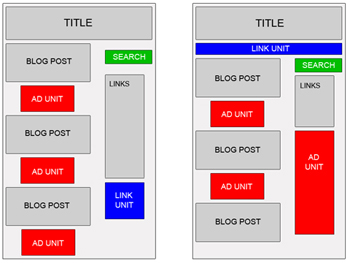
    New Ideas of Adsense Placement - New ways to earn more with Adsense


  4. BLENDED IN ARTICLE
    Ingredients:


    • 1 Medium Rectangle (300 x 250) Text Ads or 1 Square (250 x 250) Text Ads or 1 Large Rectangle (336 x 280) Text Ads
    How:


    • Place one of the above Google Adsense Ads into your article body, so it perfectly blends in. You can use this code for that purpose:

    • You may choose to make it left or right justified. According to Google Adsense Heat Map, left justified tends to bring the best CTR. But some webmasters said right justified is also working very well.

  5. RIGHT JUSTIFIED
    Ingredients:


    • 1 Skyscraper (120 x 600) Text Ads or 1 Wide Skyscraper (160 x 600) Text Ads or 1 Vertical Banner (120 x 240) Text Ads
    How:


    • Divide your webpage into two or three columns (left, middle and right).
    • Place one of the above Google Adsense Ads into the left or the right section.


  6. RIGHT BELOW IMAGES
    Ingredients:


    • 4 images (width 165 px, height 60 px),
    • 1 Leaderboard (728 x 90) Text Ads
    How:


    • Create a table (width = 728) with 2 rows.
    • Divide the first row into 4 columns and place each of the images in each column.
    • Place the leaderboard text ads in the second row.
    • Place this table below your header.

    Caution!
    You must place a border or a line between your images and your Ads, so it doesn't violate Google Adsense TOS (Terms of Service).


  7. BELOW THE HEADER
    Ingredients:


    • 1 Link Units (468 x 15) or 1 Link Units (728 x 15)
    How:


    • Place one of the above Google Adsense Link Units right below your header and match its color with your website theme.


  8. BLENDED IN NAVIGATIONAL LINKS
    Ingredients:


    • 1 Link Units (468 x 15) or 1 Link Units (728 x 15)
    How:


    • Place one of the above Google Adsense Link Units right below your header.
    • Place your navigational links below or above that Link Units and set their fonts to "Verdana, Arial, Helvetica, sans-serif" 11 px.


  9. CAMOUFLAGED AS NAVIGATIONAL LINKS
    Ingredients:


    • 1 Link Units (468 x 15) or
    • 1 Link Units (728 x 15)
    How:


    • Place one of the above Google Adsense Link Units right below your header and make it looks like your navigational links.
Thursday, November 5, 2009

List Highest Paying Google Adsense Keywords - Sort by Alphabet and Categories

List Highest Paying Google Adsense Keywords - Sort by Alphabet and Categories
     Note: All keywords are listed only for consult. If you really wanna make money from Google Adsense, I recommend you invest in your knowledge and interesting, don't run after keywords! I would suggest people to stop misusing adsense by using it only to make money by looking for hghh earning keywords and other such things. Its going to cost you in the long run. Remember adsense income does not grow on trees, its paid for by advertisers who are looking for new customers. Do them a favour by concentrating on creating unique content that you are good at. Relevant ads would appear and potential customers would click on them if they find it useful.

List Highest Paying Google Adsense Keywords - Sort by Alphabet and Categories


List Google Adsense Keywords - Sort by Alphabet and Categories

Sort by Alphabet:

A - B - C - D - E - F - G - H

I - J - K - L - M - N - O - P 

Q - R - S - T - U - W - X - Y - Z
Sort by Categories:
Other Lists:
Note: This post will be picked up and update when I have a new keywords list.

Monday, November 2, 2009

3 Quality Programs To Make Money Online

      3 programs I list below is very, very good fo earn money.

       PayPerPost: You can make money from Payperpost by writing simple reviews on your blog.You can earn $5-$1000 per review here depending upon your Blog ranking. Blog ranking includes your Google Pagerank , Realrank ,etc. But you can lost your quaility content from your blog to this program.


Pay Per Post


      Sponsored Reviews: Sponsored reviews is also like payperpost.You can make money here also by writing simple reviews on your blog.You can earn upto more than $800 per review that you made.Here also your income depends on Your Blog ranking in Linkpro, Technorati and Alexa.


Sponsored Reviews

                                                                                      
      Google Adsense: Google Adsense is a good money making source for blogger.You can earn money money from Google Adsense by showing the Google Ads in the the good place on your blog by using attractive color palette in the ad.Good place includes the top or bottom of your every blog post and in sidebar.The ads are shown according to the Content of the page.Therefore your blog must have Google Adsense High paying Keywords enrich in your post. To make money effectively with Google Adsense, you must read all this categories: http://www.vtechtip.com/search/label/Google%20Adsense.


Google Adsense

Saturday, October 24, 2009

Top 10 AdSense tips You Must Follow

AdSense Tip #1: Find your keywords

    Before placing ads on a web page, check its keyword density. A free and advanced tool for finding the most prominent keywords in a page can be found here: SEO Density Analyzer. Copy the most important keywords to a text file ([web page name]-adsense-keywords.txt).


         AdSense Tip #2: Improve your keywords

     Get keyword suggestions from Overture Search Inventory and from Google AdWords Sandbox. Get new keywords that can help you improve your ad relevance. Enter the keywords from [web page name]-adsense-keywords.txt and save the suggestions to [web page name]-adsense-suggestions.txt.

AdSense Tip #3: Keep your website focused on a theme

     Use the keyword suggestions to enhance your web pages and to build theme-based content. And also try to get your keywords into the anchor text of your incoming links as much as possible. Don’t forget that Google AdSense is keyword-targeted advertising: Google AdSense bases its advert topics on your websites content, this means that content-rich websites of a popular topic should attract a large amount of ads.

AdSense Tip #4: Write a new page every day

      One of the best tips is to add a new page to your web site every day. The more content you have, the more visitors you will get. Put an Adsense unit on each and every content page of your site. But where? You will find more about that from the next AdSense tips.


Top 10 AdSense tips You Must Follow

AdSense Tip #5: Choose the right AdSense format
  >>Read more: Which Adsense ads format is the best?
    Wider formats are successful because the ads are compact, easy to read and are complementary to the content. The top three AdSense formats are:
336×280 large rectangle
300×250 medium rectangle
160×600 wide skyscraper

Another successful format is the 468×15 horizontal ad links, that can be placed under your navigation bar.

AdSense Tip #6: Color tips

    When creating your Google AdSense ads it is recommended to use the color scheme and style of your website so that the ads blend in well. Ads without background color and borders perfom better than ads within borders with background color.

Create a custom AdSense palette:
border color = background color of your web site
background color = background color of your web site
link color = blue, color of your links
url color = black, #999999
text color = black, #333333, color of your main content
You can also rotate your color palette: select multiple color palettes that blend with your site to create variety.

AdSense Tip #7: Position tips
>>> Read more:New Ideas of Adsense Placement - New ways to earn more with Adsense
     Visitors tend to look at the big headlines to see if your page is worth reading. If you get them interested, they will read the text and look for your navigation links.

    Place the AdSense ads in a prominent place around the top/left part of your page or under your headlines, where your visitors are most likely to look at.

    If you have an article page with a long body of text, the bottom of that article is a good place for AdSense ads because your visitors read the text and then they want more resources.

AdSense Tip #8: Increase the number of ads, but not too much

     If you have a lot of text on a page, use multiple AdSense units. You can use up to three AdSense units on a page, two AdSense search boxes and one unit of ad links.

     Link units allow the user to refine what they’re interested in. So if they may not be interested in specific ads on your page, they might be interested in a particular topic, and by clicking on a link unit and a link in the link unit, they’ll be able to specify that they’re interested in that specific topic and get a lot more options and variety on the ads that might appear.

     AdSense for Search allows visitors to search Google.com or your sites (up to 3 domains). You earn money whenever they click on the ads that come up on the search results. If you click the Open search results in a new browser window checkbox in the AdSense for Search settings, you won’t lose your visitors.

AdSense Tip #9: Preview Google ads

     You can find out what ads will be served by Google AdSense if you install Google AdSense Preview Tool, a very simple tool available only for Internet Explorer 6.0. Click to advertiser sites without generating invalid clicks, and easily add their URLs to your URL filter list. Because AdSense uses geo-targeting, Google serves different ads for other countries. Instead of faking your IP or travelling abroad to test your ads, use this AdSense tool to see what ads see your visitors from France, Germany or other countries.

     There may be no Google AdSense ads available for your webpage, so Googlw will display Public Service Ads. You can hide them using alternate colors or images. Make sure you include the image in a simple html file as a link (use target=”_top”). The image size should be the same as the dimension of AdSense units. In the alternate url box, enter the absolute url of the html file.


AdSense Tip #10: What not to do

Don’t click on your own ads
Don’t ask others to click on your Google ads
Don’t manually change AdSense code
Don’t place Google ads on sites that include prohibited content (e.g.: adult sites)
Don’t employ cloaking, hidden text or farm links
Don’t use AdSense ads on the same page with similar ads (e.g.: Yahoo Publisher Network)

Wednesday, October 21, 2009

15 Effective Tips to Increase Google Adsense CTR

    How to make more money with Google Adsense? Get more clicks on ads. We all want to increase Google Adsense CTR i.e. click through ratio, because the higher times the surfer clicks the Adsense ad, higher is the payout to you. So here are 15 effective ways to improve your Adsense CTR.


    You can see:


  • Which Adsense ads format is the best?

  • New Ideas of Adsense Placement - New ways to earn more with Adsense


  • How to increase Google Adsense CTR?

    • Post Adsense ads them on text rich pages and make sure that Adsense had a bunch of keywords to work with. Getting Higher paying keywords is better of course.
    • Get rid of public service ads, which pay you nothing for your efforts. Here are some ways to avoid getting PSA’s.
    • Avoid titles like the approved ‘Sponsored Links’ and ‘Advertisements’ above the Adsense ads. Why do you want to tell the world they are ads when google already puts ‘Ads by Gooooogle’ with them. These two terms are the only ones allowed by Google TOS. Any other terms will get your account terminated. Remember to avoid these 15 Adsense mistakes.
    • Use section targeting - you can target an ad unit to a specific section of your blog, as well as block out irrelevant sections like navigational links. Useful to get more targeted ads.

    What is the best Google Adsense Placement for CTR?

    • Place Ads above the fold, i.e. you dont have to scroll down to see the ads. Moreover it loads before your entire page does. The more the visibility, the more chances a reader will click the ad.
      Best Placement for Google Adsense
    • Provide some free space around ads so that they stand out and users know where to find them. Dont clutter up the ads inside your content.
    • Experiment by changing the location of advertisements. Track them by channels to see which location works. Sometimes unusual locations can can do wonders for your CTR. Google Adsense support provides some good ideas for better blending
      Google Adsense Placement
    • Many experienced Adsense users have reported better CTR with vertical ads rather than the horizontal ones. But that really depends on your site structure.
    • Usually it is recommended to place towers on your right, as users tend to use the mouse to scroll the bar on the right side wiht a higher chance to see your ads. Some have reported doubling CTR’s by placing towers to the left rather than the right, as people have got bored of seeing ads on the right, it has something to do with the sidedness of the brain which I do not understand and there is a tendency to read from left to the right.
    • Many sites will have small ads in the top right hand corner, as they claim it is the first place where the eye sees.
    • An excellent article on Eyetracking - What We Saw When We Looked Through Their Eyes helps to tell you where users actually see first and in what order.
    • Forums are tricky becasue they have a different kind of navigation, readership and participation. Here are some ad placements suggested by Google which work best for forums
      Google Adsense for Forums

    Best Google Adsense Link Colors to get higher CTR?

    • Match the colors of your ads with the colour scheme of your site. Blending with your sites color profile helps to identify them not as ads, but as links similar to those of your site. The more the AdSense looks like part of your site, the higher CTR you will get. You can also match the Adsense fonts with your website font design for great results.
    • Blend ads with your page - remove the borders by having a similar color as your background helps to show ads as being part of your site. Do not blend text or the ‘Ads by Gooooogle’ with your background color as it is against Google TOS (Google does not like hidden text!). However, such blending may not work for you always due to banner blindness. Neither do they see the ads, not do they click on them. So sometimes a bold contrasting ad may work better depending on your website design.
    • Experiment by changing the colors, background of advertisements. You have to find out what works best for your site, not others. You can also rotate Adsense colors to reduce ad blindness.
    I hope these tips help to get your Adsense CTR up by at least 100% if not more. Good luck and make more money!

    Via: QuickOnlineTips

    Tuesday, October 20, 2009

    Which Adsense ads format is the best?

        Which Adsense ads format is the best?
        I entered the width and height for every available format of text/image ad unit, and then calculated the area and aspect ratio for each. The results are shown below, sorted descending by greatest advert area:

    Which Adsense ad format is the best?
    Name Width Height Area Aspect Ratio
    Wide Skyscraper 160 600 96000 3.75
    Large Rectangle 336 280 94080 1.20
    Medium Rectangle 300 250 75000 1.20
    Skyscraper 120 600 72000 5.00
    Leaderboard 728 90 65520 8.09
    Square 250 250 62500 1.00
    Small Square 200 200 40000 1.00
    Vertical Banner 120 240 28800 2.00
    Banner 468 60 28080 7.80
    Small Rectangle 180 150 27000 1.20
    Button 125 125 15625 1.00
    Half Banner 234 60 14040 3.90

         Note that Google say that the three best-performing ad units are the Large Rectangle, Medium Rectangle, and Wide Skyscraper. Well, these are precisely the top three in this list.

        So, it looks as though ads that cover a large area on the page get the most clicks. This is, of course, intuitively sensible. However, I wonder if the trend continues down the list; this would make Half Banner the worst format available.

    • And, you will choose which size of ads for your website?

    New Ideas of Adsense Placement - New ways to earn more with Adsense

    Adsense Placement is always researched and tested to find out the best place for Webmaster and Visitor. Most of Webmaster followed Google Adsense Guides to put adsense on their website. And most of them are right.
    According to Google:
    While this heat map is useful as a positioning guideline, we strongly recommend putting your users first when deciding on ad location. Think about their behavior on different pages, and what will be most useful and visible to them. You'll find that the most optimal ad position isn't always what you expect on certain pages.
    For example, on pages where users are typically focused on reading an article, ads placed directly below the end of the editorial content tend to perform very well. It's almost as if users finish reading and ask themselves, "What can I do next?" Precisely targeted ads can answer that question for them.

    New Ideas of Adsense Placement - New way to earn more with Adsense
    But, I have 2 new ideas, ONLY my thought, and I think they're right, you can try to test these:
    1/ Put Adsense in Left Sidebar or Right Sidebar: with Google, left is better right. But, let's think!
    - When visitors browse your site, they will look thing which are on the left side, TOP LEFT side, that is the FIRST thing people see (Based on Golden Triangle Google). HOWEVER, they just only SCAN it, SCAN it and forget it.
    - And when an ads appears on the right sidebar, in the first time, they almost won't realize it, it, but when you can make it appear “differently” with the rest, that means, after scan the page, they will notice that ads, and they not just scan, they “read” the ads, and they will easily more click the ads,…
    Of course, you must choose Adsense format fits with your template, let see Which Adsense ads format is the best? for more informations.
    That's just a little tips, but I found it work well for me and my friends.

    Example for right sidebar Ads:
    New Ideas of Adsense Placement - New ways to earn more with Adsense
    Please read 15 Effective Tips to Increase Google Adsense CTR for more informations.
    2/ Should you put ads in first page (Home page)? I found that it is better not to put ads in index page! Why?
    Almost Webmasters think that putting ads as much as possible is better for get more clicks. But you think, if visitors come to your site with main keyword, and although first page has lot of contents, they maybe click on ads and leave your site. Maybe leave FOREVER, if they find ads page is helpful, and they will forget your site.
    If the first page has not any ads, just content, they just read the content, and visit second, third pages to read more. They will "notice" more with ads, and they maybe "read" ads, not "scan", and if they click on ads, they still remember your site to come back.

    Alright? Not believe? Just try it! So you just need to decide, which side is good for you. You can try to change the ads position for several days and check the difference. For the combination of left and right positions for ads, I think a lense page in Squidoo.com did it well.

    Thursday, June 18, 2009

    Now You Can Change Adsense Font

    Font size matters

    Since February, you've been able to change the font faces of your ad units. We're now happy to announce the launch of a related feature you've been asking for -- the ability to change the font size of the text in your ad units. You can now select from small, medium, and large font sizes for ad units on pages in Latin-character languages. Just like with the current font face options, size options appear in every account but will only be applied to ad units on pages primarily in Latin-based characters for now.

    The font size you choose will be applied to the body of the ad, with the title scaled appropriately. In order to fit the ad text correctly, the actual font size will vary for each format size, font face, and user-specific settings such as browsers and operating systems. In addition, some formats sizes currently have very limited room, so the font size application will be most apparent in cases where the number of ads appearing in your ad units varies automatically in order to maximize your performance.

    Your ads are currently set at the default size for AdSense, which is the equivalent of 'small'. You can select a new font size on an account-wide basis in the Ad Display Preference section of your My Account tab, or on an individual ad unit basis for new and existing ad units.


    If you're creating new ad units, you can choose between the AdSense default font size, your new account-wide font size (if you've selected one using the instructions above), or a separate size. To update existing ad units you've created using the Manage Ads feature, visit the 'Manage Ads' page under your AdSense Setup tab. Any font size changes you make on an individual ad unit basis will be maintained even if you change your account-wide default in the future.

    Also, a bit of advance notice: soon, we'll also be changing the default font size across AdSense in ad units from 'small' to 'medium'. We've heard from some of you that the current font size can be too small, and our testing also showed that slightly larger font sizes improved performance. Any ad units set to the default font size will automatically be updated to display the larger setting. If you'd prefer to stick with today's font size, you can set your desired font size as 'small' across your account.

    We encourage you to combine these new font size options with the other customization options in your account to test the optimal layout for your pages. We're excited about this launch, and we'll be sure to follow up with another post to let you know once the default font size has been changed.

    Via: Inside Adsense

    Monday, June 15, 2009

    Google Blogger Has Been Added Google Adsense

        Google Blogger (Blogspot) is one of the most popular blog platrom. Google provide it completely free without any ads. Google only add one host publisher id in Google Adsense code (if you're an Adsense Publisher and advertise in your Blogspot.).


        Today, when posting new article for my blog, I've just see an Google Adsense ads in the right of browser. This mean Google want to make money from user of Blogger. And I really happy because of this. I hope with this ads, Google can support and develope Blogger better and better.

    Thursday, February 26, 2009

    How about Google Adsense Premium account?

    Google AdSense, which has the largest number of publishers in its network also has a rarely know feature called ‘Premium Google AdSense Account’. This feature is particularly for those sites which receive more than 20 million page views or 5 million searches a month.

    Premium AdSense Account Some of the sites like CNN, About.com, MySpace, AOL are among Premium AdSense Account Holders. The left image is the screenshot of the AdSense’s ads on EzineArticles.com.
    As you can see at the left, these ads are not like normal AdSense’s ads. Premium AdSense Ads can be customized to fit the site’s design and layout. This is an advantage of Premium AdSense Account.

    Apart from this, Premium AdSense Account Holders have some exceptions in AdSense TOS. Some of them are :
    Unlike normal publishers, premium publishers can pre-populate the search box and link them directly to AdSense Search Result Pages.

    Premium AdSense Publishers can also place mature content on their site. They are even allowed to publish content about Gambling and Casino.

    Premium AdSense Account Holders can also remove the ‘Ads By Google’ line and place something of their own. Thus, the visitors will not know that these ads are served by Google.
    Google provides a special Account manager through which the AdSense publishers can customize the colors, layout, fonts etc.. and change the way the ads look.

    Premium Publishers can negotiate the percentage shared between them and Google while normal publishers have to accept whatever Google gives.

    Finally, Google AdSense Premium Publishers get an opportunity to become much more richer.

    Via: http://www.websack.net/2008/09/24/learn-about-premium-adsense-account/

    Monday, January 5, 2009

    Download ebook Google Money Pro 97$ for FREE

    Google Money Pro THE BEST BOOK ON GOOGLE ADWORD

    Let me put it this way, for the past 7 years my life has revolved around advertising websites online through Google. I know every rule, advertising policy, and exactly how to advertise any website to make it unbelievably profitable. In fact, Google has actually recognized me as one of their Qualified Advertising Professionals.
    Learn How I Use Google - the Worlds Most Popular Search Engine, To Make THOUSANDS of Dollars Every Day through Affiliate Marketing!

    I have combined my knowledge of Google advertising with internet affiliate marketing and have put all of this information into a downloadable guide.
    You WILL NOT find any of the information contained in Google Money Pro anywhere else on the web. Google Money Pro contains all of my personal secrets, tips, and techniques allowing you to set up an extremely profitable affiliate account by professionally advertising with Google AdWords. Best of all, I show you how to do everything in an easy to follow, step by step, illustrated guide.

    I wrote Google Money Pro so anyone can benefit from it. This means that if you don't have a website or a product and you don't have any internet or business experience, Google Money Pro will be perfect for you. It starts with extremely basic information that everyone can understand and as you read along it will gradually become more advanced so by the time you're finished reading it you will fully understand everything. I've had teenagers to people in their late 80s purchase Google Money Pro and email me telling me how much they appreciated me writing it, so I know everyone can benefit from this. If you ever get lost, confused, or need help in any way just email me and I'll personally reply to your email with the answer to your question.

    Even if you're already experienced with internet marketing and Google AdWords, you'll be amazed at how many things you're doing wrong that's costing you money every single day. You would be surprised to know how many books on Google AdWords are completely wrong and contain information that's costing you thousands of dollars.

    http://www.mediafire.com/?jhvjm0qytmz
    I receive emails all the time with people listing off all the books they've bought on internet marketing and they ask me "Why does the information in Google Money Pro goes against what all their other books say to do". I even receive emails from my competition telling me their customers are asking questions referring to my book and they don't know how to answer them properly. This is because the money making techniques in Google Money Pro are completely different from any other book.


    This is also why I am able to produce five times as many sales per month as my competitors.