Showing posts with label Video Tutorials. Show all posts

Friday, December 4, 2009

10 Ways To Access Facebook and Twitter When Blocked [Update 3 New Ways]

     Now a day, social networks as Facebook and Twitter is used by so many users. But in a lot of company, these social networks are blocked by firewall, and you can not access. I will show you 7 ways to acces Facebook, Twitter or any blocked site easily.
7 Ways To Access Facebook and Twitter When Blocked
    1/ Use Proxy/Socks: this is a very popular way to visit any site you want without any restriction. All you need is find a good proxy to use. But when use proxy, your speed can be reduce because of the respond time of proxy server. You can also buy a private socks for the best quaility. If not, just find free proxy from sharing site as http://sockslist.net/, http://www.checker.freeproxy.ru/checker/last_checked_proxies.php, http://aliveproxy.com/socks5-list/ etc. All proxy or socks have the same format: 123.123.123.123:1234, with number before : are ip address, and after are port. To use it, you need configure you broswer as following:
Find proxy and socks
- Firefox: Tools > Options > Advanced > Networks > Settings > Manual Proxy Configurations > Socks Host.
- Internet Explorer: Tools > Internet Settings > Connections > Lan Settings > Use a Proxy Server for you LAN.
- Chrome: Options > Under the Hood > Change Proxy Settings > Connections > Lan Settings > Use a Proxy Server for you LAN.
- Opera: Tools > Preferences > Advanced > Networks > Proxy Servers.
Then fill IP and port and apply. To remove it, just take it back to default.
7 Ways To Access Facebook and Twitter When Blocked
Configure Proxy/Socks in Firefox

     2/ Use Fake IP Software: some software use for faking and hiding your IP address as Auto Hide IP, Real Hide IP, Hide IP NG, Invisible Browsing etc. They still can decrease speed but not to much.

     3/ Use UltraSurf: the easiest and fastest way to hide IP and access to any site you want. All traffic will be brought through UltraReach server. So that the speed is almost no change. Download UltraSurf, newest version is 9.6. After download, you just run it, and an Internet Explorer windows will open for using. You can also use a add-ons to use UltraSurf with Firefox. Note: to use in Firefox, you must download UltraSurf application, run it and activate in Firefox. UltraSurf is totally free and no need to setup. [Go to Homepage].
7 Ways To Access Facebook and Twitter When Blocked
UltraSurf with Internet Explorer

     4/ Use Free Proxy Website: there are many website help you surf web through a proxy. Two of the best site is HideMyAss and Defilter. All you need to do is input url of site in blank field and press enter.
HideMyAss using
HideMyAss service
Defilter using
DeFilter service

      5/ Use Google Translate: what? Yes, this is Google Translate, which can help you translate a website and browse it through Google Server. But you can see what have been translated, this mean just only text, and all images maybe still blocked. Just go to http://translate.google.com, input address, choose target language is your language, and source language is another. Or use this link and replace you url to red mark: http://translate.google.com/translate?hl=en&sl=ja&tl=en&u=http%3A%2F%2Ffacebook.com%2F&anno=2.
7 Ways To Access Facebook and Twitter When Blocked
Google Translate with Facebook

     6/ Use OpearTor: OperaTor is a free browser that base on Opera 10.0 and add more features as auto use proxy and clean privacy infomations. With proxy, you can access any webpage although blocked. Proxy can from USA, France of any country as Espanol, Italia etc. And you no need to find it yourself.
OperaTor
OperaTor auto search and apply proxy
      7/ Use OpenDNS: Open DNS is a free DNS server that offer you DNS resolution for consumers and businesses as an alternative to using their Internet service provider's DNS servers. By placing company servers in strategic locations and employing a large cache of the domain names, OpenDNS usually processes queries much more quickly, thereby increasing page retrieval speed. DNS query results are sometimes cached by the local operating system and/or applications, so this speed increase may not be noticeable with every request, but only with requests that are not stored in a local cache. First, you need to change network configuration of window:
     - With Windows XP: go to Control Panel --> Network and Internet Connections --> Network Connections, right click to Local Area Network and choose Properties. In list This connection uses the following items, choose Internet Protocal (TCP/IP) and click Properties. In new windows, you click Use the folloing DNS server addresses, and at Prefered DNS Server, fill 208.67.222.222, and at Alternate DNS Server fill 208.67.220.220. Then OK to finish.
     - With Windows Vista or Windows 7, go to Control Panel --> Network and Internet --> Network and Sharing Center > View Status > Properties and the configure as XP.
     Find more infomation at home page: http://www.opendns.com/
OpenDNS
Now, Another Free DNS Service is Google Public DNS, You can use as a Open DNS altenative Read more.
      8/ Use Opera 10 With Turbo Mode. When Turbo Mode is running, all connect will be through Opera server, so you will not be blocked as normal. Beside this, Opera Turbo let you browse web faster and lighter. Download Opera 10 here.
     9/ Configure Your Hosts File (Only for Facebook): first, locate your hosts file at \windows\system32\drivers\etc, double click at hosts (no extension) and open it with Notepad. Then add these lines at the end:

69.63.187.17 facebook.com
69.63.181.22 login.facebook.com
69.63.186.12 apps.facebook.com
69.63.187.17 www.facebook.com
69.63.181.22 www.login.facebook.com
69.63.186.12 www.apps.facebook.com


Wednesday, November 18, 2009

4 Ways To Repair WinRAR Error Files

    Everyday, I got a thousand comments of visitor about CRC Error of file *.rar. But getting this error not mean that you can't extract and use file anymore. There are many ways and software help you repair this error and use these files again.
    WinRAR Error (mostly CRC Error) often happen when you extract a very large file or extract multi files (named part01.rar, part02.rar...). If you get this error when extract multi files, first you need to know exactly which file is error. When extracting, WinRAR Diagnostic Message will show all files that getting error and what error is.You must remember name of error files to fix it.

WinRAR Diagnostic Message
WinRAR Diagnostic Message Display Error

Then I will show you 4 ways to do this.

     1/ Use WinRAR Repair: open error file with WinRAR. Then go to menu Tools > Repair Archive (hotkey Alt + R). You can also browse a folder with WinRAR and choose error file, then click Repair button in toolbar.
- In next dialog, choose folder to put repaired file and then click OK to start repair.
- File after repaired will be named fixed..
 NOTE: after repair, you need to delete error file, rename repaired file to original name and try to extract again.

Repair Error RAR Files With WinRAR

      2/ Use RAR Repair Tool: this simple software will help you repair error rar completely. Almost corrupt files can be repaired with this software. Different with WinRAR, RAR Repair Tool do not repair anyfile. RAR Repair Tool can repair single file or check and repair all parts from a folder.
    - It easy to use, just go to File > Open > choose error file and click Repair button, then choose folder to save repaired file, OK and done.
WinRAR Repair Tool
RAR Repair Tool
    3/ Use RAR Recovery Toolbox: Like RAR Repair Tool, RAR Recovery Toolbox can recover all files in rar file or in all part. After recover, you can use these files without extracting.
   - At first step, you need to choose source file name. You can also choose a part of WinRAR (*.part01.rar...). Then click Next.
   - At Select files to recover, you select all files in error rar file and click Next, select folder to save recovered data and click Next to start fixed and recover. RAR Recovery Toolbox will repair and extract all files to this folder.

RAR Recovery Toolbox
      4/ If these softwares can help you, the last choice is redownload corrupt file. Maybe files caused error while downloading, redownload can help.

Sunday, November 15, 2009

Yahoo! Messenger 10 Final (10.0.0.1102) - Offline Installer + Portable for Download

The Yahoo Messenger team has released the long awaited Yahoo Messenger 10 final. The popular instant messenger was previously only available in beta versions with many of them leaked and not officially released by Yahoo. The new Yahoo Messenger 10 can be downloaded directly from the Yahoo Messenger website where it is available for Microsoft Windows and Apple Macintosh, mobile devices, Apple’s iPhone and as a web version that does not require installation at all.

Several new and improved features have been added to Yahoo Messenger 10. The following list contains some of these features. It has been directly taken from the blog post that announced the final version of Yahoo Messenger 10:

High-quality video calls
We’ve completely redesigned our 1:1 webcam feature (under the hood too). Now you can make a high-quality video call to a friend with synched audio, right in the IM window. Features include the ability to swap video windows, position the video windows side-by-side, mute the call or place it on hold. You can even go full-screen with your video call. To get started, click the new “Video Call” button in the IM window (your friend also needs to be on Yahoo! Messenger 10). New “Y! Updates” view of your contact list
People are busy these days, doing all sorts of interesting things online. To help you keep up with your friends, we added an alternate view of your contact list that shows a real-time stream of their updates, including Messenger status message changes. If they’ve opted-in to share their updates via Yahoo!, you’ll be able to see what they’re saying on Twitter, reading on Yahoo! Buzz, listening to on last.fm, and more.
We also added additional features for how and when you see your friends’ updates. When a new update comes in, a “toast” alert will pop up in the lower right corner of your screen. If you want to disable these, go to Messenger > Preferences > Yahoo! Updates. You can turn alerts on and off and even update preferences by contact or by type of update.

Yahoo! Messenger 10 Final (10.0.0.1102) - Offline Installer + Portable for Download

Find more to chat about
Within the new “Yahoo! Updates” view, you’re sure to find more to talk about with your friends. To make it easy, we added a hover menu that lets you quickly IM a friend about their update. When you do, the update appears inline in the conversation window, so when you start your IM with “I can’t believe you like this song!”, your friend will know what you’re talking about. Note that your friend needs to also be on Yahoo! Messenger 10 to see the update inline.
Change your language easily
If you use the U.S. version but wish it could be in your local language, you’re in luck. When you start up Yahoo! Messenger 10, you’ll notice a new language menu on the sign-in screen. Choose from 16 different languages and the buttons, menus and various parts of the interface will change to that language. If you’re already signed in, you can also change your language under Messenger > Preferences > Language (you’ll have to restart Yahoo! Messenger for it to take effect).

 
The default Yahoo Messenger 10 download will download a so called web installer which is a small setup file that will try to download the remaining data from the Internet during installation. This requires an active Internet connection. Users who prefer a direct download can download the Yahoo Messenger 10 Windows offline installer here. It is either way recommended to do a custom installation in the instant messenger itself to avoid installing components like the Yahoo Toolbar to the computer system.

Saturday, October 31, 2009

TuneUp Utilities 2010 9.0.2000.16 Final comes with Turbo Mode and Live Optimization

    TuneUp Utilities is one of the best and the famous System Utilites on the World. TuneUp Utilities is ranked #3 in TopTenReviews Product Comparisons [Read more]. But with me, TuneUp Utilities is the best tool for system ever. With hundred of tools for Windows as Optimizer, Cleaner, Repairer, One-Click Optimizer and more. TuneUp Utilities is completely support Windows 7.


TuneUp Utilities 2010 9 Main Interface

Main screen of TuneUp Utilities 2010

Today, TuneUp is released with 2 great new features, this is Turbo Mode and Live Optimization.

Turbo Mode


- Turbo Mode: at main screen, click to ground button at left bottom to Active this function. Turbo Mode works well, and I don't see any problem with it. Effiency:


  • Concentrates the entire performance of the PC on active programs
  • Turns off unnecessary or processes specified by the user
  • Provides a smoother working or gaming experience

    Once you switch on the Turbo Mode from TuneUp Utilities, functions that are used rarely or not at all including planned background maintenance tasks are disabled. This provides concentrated power for the currently active program. Or for more frames per seconds in games.

    If you need specific Windows services such as the Search function or the Sidebar, background programs such as printing or planned Windows maintenance tasks, Turbo Mode can be easily switched off again! If desired, the user can also decide which programs should be switched off to increase performance.
                                                                                                                                                                                                                                                                                                                                                                                                    
                                                           
Configure Live Optimization


- Live Optimization: as default, this function is ON, and automatically optimize entire system. You can see Live Optimization icon at system tray as a Clock and it swings when TuneUp is optimizing.


TuneUp Utilities 2010 9.0.2000.16 Final comes with Turbo Mode and Live Optimization


TuneUp Utilites System tray Icon and Dialog

Configure Live Optimization

  • Manages resources efficiently
  • Improves program response speed
  • Accelerates program startup times


    Live Optimization automatically prevents background programs from reserving too much PC performance for themselves. You will experience a distinctly quicker program startup, greater speed, and more stability on the computer. Programs operate considerably faster and games run with visibly more frames per second.

     Turbo Mode and Live Optimization are a couple features help your system work faster, bester and safier!

    Bedides these, TuneUp One Click Optimizer is improved much more, add Registry Defrag and Optimizer System startup and shutdown. Keep your PC always fast and clean.


TuneUp Utilities 2010 One Click Optimizer

Video Review:

VMWare Workstation 7.0 Released With New Features

VMWare is the best software to create a virtual machine with full function as a real computer. VMWare can simulate a network with virtual card as NAT, bridge etc.
At version 7, VMWare increase hardware graphic support, support Windows 7 better, add more features as Take a Snapshot (custom create a statement of currently machine), Record Execution of Virtual Machine, ACE feature, create a Package etc.


VMWare Workstation 7.0 Released With New Features

More Information from VMWare:

Introducing VMware Workstation 7

Winner of more than 50 industry awards, VMware Workstation transforms the way technical professionals develop, test, demo, and deploy software. Innovative features help software developers, QA engineers, sales professionals, and IT administrators to reduce hardware cost, save time, minimize risk, and streamline tasks that save time and improve productivity.

Ultimate Desktop Virtualization Product for Windows 7

Run Windows 7 in a virtual machine with the industry’s first support for Windows Aero 3D graphics. Easy Install makes installing 32-bit and 64-bit versions of Windows 7 in a virtual machine even easier than on your physical PC. VMware Workstation 7 works with Flip 3D and Aero Peek to show live thumbnails of your virtual machines. Better than Windows XP Mode, you can run Windows XP with 3D graphics, faster performance, and tighter integration with Unity, shared folders and drag and drop convenience. VMware Workstation is optimized for maximum performance when running on 32-bit and 64-bit Windows 7 PCs.


Best 3D Graphics Just Got Better

VMware Workstation was the first to support 3D graphics in virtualized environments and is now the first to support Windows Aero in Windows Vista and Windows 7 virtual machines. Run even more 3D applications with support for DirectX 9.0c Shader Model 3 and OpenGL 2.13D graphics in Windows virtual machines.

Most Advanced Virtualization Platform

Create virtual machines with up to 4 virtual processors or 4 virtual cores and up to 32GB of memory per virtual machine. Driverless printing makes your PC printers automatically accessible to your Windows and Linux virtual machines—no configuration or drivers required. Smart card authentication enables you to dedicate a Smart Card reader to a virtual machines or share access.


Features Professionals Cannot Live Without

• Install and run VMware vSphere 4 and VMware ESXi in a virtual machine
• New IDE integrations for the SpringSource Tools Suite and Eclipse IDE for C/C++
• Replay debugging is now easier and faster
• Remote Replay Debugging makes it easier to share virtual machine recordings for analysis

More Refined Than Ever

Protect from Prying Eyes
Protect your virtual machines from prying eyes with 256-bit AES encryption.
Printing that Just Works
Driver-less printing makes your PC printers automatically accessible to your Windows and Linux VMs—no configuration or drivers required. Your PC’s default printer even shows up as the default, too.
Go Back in Time
Buggy applications, hardware failures, viruses and other malware do not give you fair warning to take a manual snapshot. AutoProtect luckily automatically takes snapshots at set intervals, protecting you from unexpected bumps in the road, making it’s easy to go back in time to when things were good.
Free Up System Resources
Pause a virtual machine to free up CPU resources for use by other running virtual machines or demanding applications.


Take a closer look with Video Review:

Thursday, October 29, 2009

Disable Firefox Extension Compatibility Check to use Old Add-ons

     Most of old Add-ons don't work on new Firefox such as Firefox 3.6, Firefox 3.7, 4.0, even Firefox 3.5. Although you can edit add-ons files (*.xpi) to make it support newer Firefox version, but this way is complicated and waste time.
     And the best way is directly disable compatibility check of Firefox. With this way, you can install any add-ons to any Firefox version without warning about version support, fast and easily. But note that, you can install not mean you can use it normally, maybe get some error or even add-on can't run (rarely). I've used this way since Firefox 3.0 beta and everything are alright.                                                                                                                                       
Now, let's do it. Follow these steps:

     1/ Open Firefox, type about:config at address bar and Enter. Press I'll be careful, I promise! to continue.


Firefox about config

     2/ Now, you will see Firefox config page, right click on blank area and choose New > Boolean, at New Boolean Value dialog, type this name: extensions.checkCompatibility and then OK.


Firefox add new boolean

     3/ In next dialog, you must choose False. If you choose True, Extenstion Compatibility is still working. Last, restart you Firefox and start install any add-ons you want.


Firefox addons compatibility check disabled

NOTE:
     - This tip works fine on all version of Firefox 3.x and include Firefox 4.x.
     - After did this step, when open Add-ons Manager, you will see yellow bar talks that Add-on Compatibility is disable. You can click Enable button to enable it (should not). Furthermore, you can see a warning icon at some add-ons icon with note "... not compatible with Firefox...". Just ignore it.

Video Tutorials:

Thursday, October 22, 2009

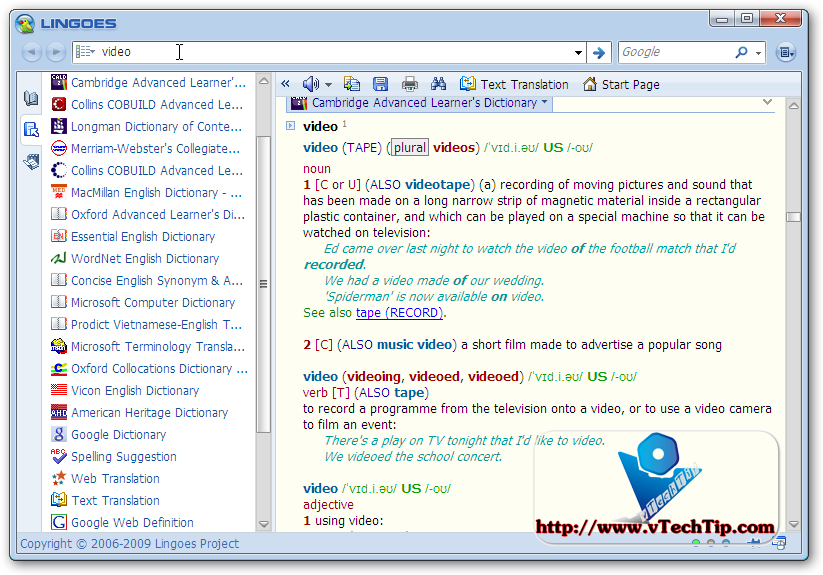
Lingoes Translator 2 with ton of Dictionary collection

    Lingoes is a best free Dictionary Software with many functions of paid software as capture word on screen, add and remove dictionary, add or remove speech engine etc.
    Lingoes features:

    It offers full text translation, capture word on screen, translate selected text and pronouncing text, and abundant free dictionaries as a new gerenation dictionary and translation software. Lingoes offers users the instantest way to look up dictionaries and translation among English, French, German, Spanish, Italian, Russian, Chinese, Japanese, Korean, Swedish, Thai, Turkish, Vietnamese, Greek, Polish, Arabic, Hebrew and more over 80 languages. With the creative cursor translator, Lingoes automatically recognizes the word and its definition as soon as you move the cursor and point to any text, then press hotkey. It wouldn't disturb your current work.
    Lingoes owns full features of current popular commercial software, and creatively develop cross language design and open dictionaries management. A plenty of dictionaries and thesauruses are listed for free download. Lingoes is the best tool for learning all kinds of languages.

    With me, one of the best function of Lingoes is you can add and remove various of dictionaries from Lingoes server. Just download and install, and you can manage these dictionnaries easily.
https://blogger.googleusercontent.com/img/b/R29vZ2xl/AVvXsEjIWM3v-OFLL2TsKnms0q1npUxWovuqWC_WchyphenhyphenHgMFvyXeoUjYDDGZUs971rNj93wvNFNoCGtLjW2qnyOdf8l6ibzGJpa0XtKIF6G7T1OQuxOLcccc72IIOWsOblJ1qbNfrNMbvZb3p8e8/
   With Dictionary collection of vTechTip, you don't need to download and install anything, just download, unpack and use with ton of the most famous dictionaries, including:
 - Cambridge Advanced Learner Dictionary
 - Longman Dictionary of COntemporary English
 - MacMillan-Webster's Dictionary - American
 - Oxford dictionary of Law
 - Oxford Advanced Learner Dicitnary
 - Essential Englist Dictionary
 - Wordnet English Dictionary
 - Collin Cobuild English Grammar
 - Microsoft Computer Dictionary
 - English Slang Dictionary
 - Longman Language Activator
 - Microsoft Terminalogy Translation
 - And some of Online Dicrectiories
And much more!

    But I don't know why some of these dictionaries can not available for download from Lingoes sever anymore! But in this collection, you can use it without doubt of download and price, just FREE ang legal.


    After download and extract, you will get a "dict" directory. To add these dictionaries to Lingoes, just copy "dict" directory to \Lingoes\Translator2\dict to another place (for backuping), and then replace new "dict" to old "dict" directory. To update Lingoes to new version, first you need to download Lingoes, and then replace "dict" directory to new Lingoes.
   Video Tutorials:

   Download newest version of Lingoes here.

   Download Lingoes Dictionary Collection:

Sunday, October 18, 2009

AeroSnap and AeroShake for XP and Vista with TrueTransparency 1.2

TrueTransparency was well-know as the best software to make XP windows and border transparent as Windows Vista.

TrueTransparency is so easy to use, just start it and enjoy! It uses a small of RAM, only about 1 - 5 MB or event less.

This True Transparency of vTechTip was included total 30 skins from over network. You can change by right-click at system tray icon and choose Skins > Skin name.

In this 1.2 version, you can use AeroSnap and AeroShake of Windows in currently version of Windows (including XP and Vista). To know how these 2 funtions work, just see video.
AeroSnap and AeroShake for XP and Vista with TrueTransparency 1.2
Video Tutorials: