Showing posts with label Top List. Show all posts

Wednesday, November 18, 2009

4 Ways To Repair WinRAR Error Files

    Everyday, I got a thousand comments of visitor about CRC Error of file *.rar. But getting this error not mean that you can't extract and use file anymore. There are many ways and software help you repair this error and use these files again.
    WinRAR Error (mostly CRC Error) often happen when you extract a very large file or extract multi files (named part01.rar, part02.rar...). If you get this error when extract multi files, first you need to know exactly which file is error. When extracting, WinRAR Diagnostic Message will show all files that getting error and what error is.You must remember name of error files to fix it.

WinRAR Diagnostic Message
WinRAR Diagnostic Message Display Error

Then I will show you 4 ways to do this.

     1/ Use WinRAR Repair: open error file with WinRAR. Then go to menu Tools > Repair Archive (hotkey Alt + R). You can also browse a folder with WinRAR and choose error file, then click Repair button in toolbar.
- In next dialog, choose folder to put repaired file and then click OK to start repair.
- File after repaired will be named fixed..
 NOTE: after repair, you need to delete error file, rename repaired file to original name and try to extract again.

Repair Error RAR Files With WinRAR

      2/ Use RAR Repair Tool: this simple software will help you repair error rar completely. Almost corrupt files can be repaired with this software. Different with WinRAR, RAR Repair Tool do not repair anyfile. RAR Repair Tool can repair single file or check and repair all parts from a folder.
    - It easy to use, just go to File > Open > choose error file and click Repair button, then choose folder to save repaired file, OK and done.
WinRAR Repair Tool
RAR Repair Tool
    3/ Use RAR Recovery Toolbox: Like RAR Repair Tool, RAR Recovery Toolbox can recover all files in rar file or in all part. After recover, you can use these files without extracting.
   - At first step, you need to choose source file name. You can also choose a part of WinRAR (*.part01.rar...). Then click Next.
   - At Select files to recover, you select all files in error rar file and click Next, select folder to save recovered data and click Next to start fixed and recover. RAR Recovery Toolbox will repair and extract all files to this folder.

RAR Recovery Toolbox
      4/ If these softwares can help you, the last choice is redownload corrupt file. Maybe files caused error while downloading, redownload can help.

Tuesday, November 17, 2009

History of Windows Startup and Shutdown Sound All Version [Up to Windows 7 Final]

     1/ Windows 1.x: Released November 25, 1985.
     2/ Windows 2.x: Released November, 1987.
     3/ Windows 3.x: Released 18, March, 1992.
These versions of operating system do not have startup and shutdown sound yet.

History of Windows Startup and Shutdown Sound All Version [Up to Windows 7 Final]
Up to Windows 3.1, Microsoft still did not equip startup and shutdown sound for their Operating System

    4/ Windows 95: Released 24 August, 1995. Duration Startup: 00:06, Shutdown: 00:01.
    5/ Windows NT: Released 29 July, 1996. Startup and Shutdown: 00:09.
    6/ Windows 98:  Released 25 Jun, 1998. Startup: 00:07, Shutdown: 00:03.

Windows 2000
Windows 95, the first operating system that supports startup and shutdown sound.

    7/ Windows 2000: Released 27 Feb, 2000.
    8/ Windows ME (Millennium Edition): 14 Sep, 2000.
    Windows 2000 and Windows ME have the same startup and shutdown sound. Duration: Startup: 00:03, Shutdown: 00:05.
    9/ Windows XP: Released 21 Oct, 2001.
    10/ Windows Server 2003: Released 24 Apr, 2003.
    Windows XP and Windows 2003 have the same starup and shutdown sound. Duration: Startup: 00:04, Shutdown: 00:03.
   11/ Windows Vista: Released 30 Jan, 2007.
   12/ Windows Server 2008: Released 28 Feb, 2008.
   13/ Windows 7: Released 23 Oct 2009.
These 3 versions of Windows have the same startup and shutdown sound.


History of Windows Startup and Shutdown Sound All Version [Up to Windows 7 Final]

But beside this default, Windows 7 also has each sound scheme for every themes. Windows 7 is the first operating system that have multi startup and shutdown sounds.

Watch Video:

In my opinion, I like Windows 2000 startup and shutdown best. How about you? Please comment and tell your idea :)

Wednesday, November 11, 2009

9 Google Adsense Placement Recipes

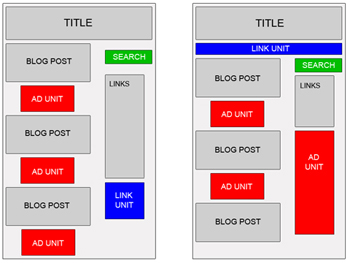
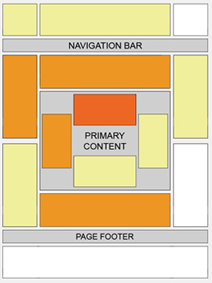
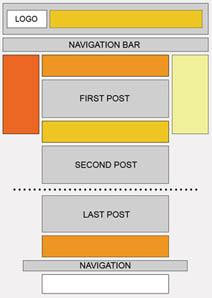
    Although placement of Google Adsense is base on personal idea, but you still need a recipe to put it alright and do not against Adsense TOS. At fisrt, you must choose the suitable size for each element of website, please follow this: Which Adsense ads format is the best?. And then, you can choose location of them, ex: New Ideas of Adsense Placement - New ways to earn more with Adsense. So that, you can get the best CTR for you site (read more 15 Effective Tips to Increase Google Adsense CTR).

    And there is 9 recipes:
  1. ABOVE THE FOLD, BELOW THE TITLE
    Ingredients:


    • 1 Medium Rectangle (300 x 250) Text Ads or 1 Square (250 x 250) Text Ads or 1 Large Rectangle (336 x 280) Text Ads or Banner (468 x 60) Text Ads
    How:


    • Place one of the above Google Adsense Ads at the beginning of your article, just right below the title.


  2. AT THE END OF AN ARTICLE
    Ingredients:


    • 1 Medium Rectangle (300 x 250) Text Ads or 1 Square (250 x 250) Text Ads or 1 Large Rectangle (336 x 280) Text Ads or Banner (468 x 60) Text Ads
    How:


    • Place one of the above Google Adsense Ads at the end of your article.


  3. NEXT TO AN IMAGE
    Ingredients:


    • 1 Medium Rectangle (300 x 250) Text Ads or 1 Square (250 x 250) Text Ads or 1 Large Rectangle (336 x 280) Text Ads,
    • 1 image (width 190 px, height 280 px) or 4 images (width 60 px, height 60 px)
    How:


    • First Approach


      • Create a table (width = 550), and divide it into two columns.
      • Place Google Adsense Text Ads into the left column.
      • Place your 190 x 280 image into the right column.

    • Second Approach


      • Create a table (width = 550), and divide it into two columns.
      • Divide the left column into four rows, and place each of your 60 x 60 images into each row.
      • Place Google Adsense Text Ads into the right column.

    Caution!
    You must place a border or a line between your images and your Ads, so it doesn't violate Google Adsense TOS (Terms of Service).
    New Ideas of Adsense Placement - New ways to earn more with Adsense


  4. BLENDED IN ARTICLE
    Ingredients:


    • 1 Medium Rectangle (300 x 250) Text Ads or 1 Square (250 x 250) Text Ads or 1 Large Rectangle (336 x 280) Text Ads
    How:


    • Place one of the above Google Adsense Ads into your article body, so it perfectly blends in. You can use this code for that purpose:

    • You may choose to make it left or right justified. According to Google Adsense Heat Map, left justified tends to bring the best CTR. But some webmasters said right justified is also working very well.

  5. RIGHT JUSTIFIED
    Ingredients:


    • 1 Skyscraper (120 x 600) Text Ads or 1 Wide Skyscraper (160 x 600) Text Ads or 1 Vertical Banner (120 x 240) Text Ads
    How:


    • Divide your webpage into two or three columns (left, middle and right).
    • Place one of the above Google Adsense Ads into the left or the right section.


  6. RIGHT BELOW IMAGES
    Ingredients:


    • 4 images (width 165 px, height 60 px),
    • 1 Leaderboard (728 x 90) Text Ads
    How:


    • Create a table (width = 728) with 2 rows.
    • Divide the first row into 4 columns and place each of the images in each column.
    • Place the leaderboard text ads in the second row.
    • Place this table below your header.

    Caution!
    You must place a border or a line between your images and your Ads, so it doesn't violate Google Adsense TOS (Terms of Service).


  7. BELOW THE HEADER
    Ingredients:


    • 1 Link Units (468 x 15) or 1 Link Units (728 x 15)
    How:


    • Place one of the above Google Adsense Link Units right below your header and match its color with your website theme.


  8. BLENDED IN NAVIGATIONAL LINKS
    Ingredients:


    • 1 Link Units (468 x 15) or 1 Link Units (728 x 15)
    How:


    • Place one of the above Google Adsense Link Units right below your header.
    • Place your navigational links below or above that Link Units and set their fonts to "Verdana, Arial, Helvetica, sans-serif" 11 px.


  9. CAMOUFLAGED AS NAVIGATIONAL LINKS
    Ingredients:


    • 1 Link Units (468 x 15) or
    • 1 Link Units (728 x 15)
    How:


    • Place one of the above Google Adsense Link Units right below your header and make it looks like your navigational links.

Sunday, November 8, 2009

101 Ways to Make Money from Your Blog

    If you’re a well-loved blogger, there’s a good chance that your readers would like to show their support. Give them what they want and make money by taking advantage of merchandising opportunities.
1. CafePress.com: This perennial favorite makes it easy for you to put your blog’s logo on shirts, bags, coasters and other items.
2. Self-Published Books: If your readers like your content, they may want to have something they can own offline or even share with friends. Create a book with self-publishing services like Lulu, and you’ll earn profits even without a huge book deal.
3. Printfection.com: Design and sell custom products with Printfection.com.
4. Hard-Copy Content: Create a CD-ROM “book” with cleanly organized content that can be accessed offline. You can take things a step further and sell subscriptions for future updates to the system.
5. GoodStorm: Like CafePress.com and Printfection.com, GoodStorm is a nice way to create and sell your own merchandising products.
Paid Content
Paid content is a good monetization method for bloggers that regularly offer useful information — especially if this information helps others make money. As with all monetization methods, it’s all in the approach. Don’t create misleading previews of content that requires a membership to read in full. Rather, devote special sections of premium content to readers who are willing to pay for the information.
6. E-Books: Whether it’s a compilation of your best tips or a new idea altogether, an e-book is a good, reader-friendly way to package content.
7. White Papers: Like e-books, white papers are a smaller, more technical version of your content.
8. Phone Calls: Sell one-on-one phone calls for advice and other consulting through Ether.
9. Miniguides: If you’ve just run a particularly helpful series, package it up into a miniguide.
10. Tutorials: Gather your knowledge and compile it into a tutorial that relies upon your expert advice.
11. Members-Only Sections: Whether you’re providing access to published items or just ad-free content, make sure you’re delivering a product that your readers are willing to pay for.
12. TextMarks Inc.: Charge readers to get text-message alerts about your content through TextMarks.
13. X-Events: Project physical events online and create revenue by charging admission, attracting sponsors and selling subscriptions to future events.
14. Podcasts: Podcasts may be a novelty to your readers, and many of them are probably willing to pay to be able to hear your entries on the go.
15. Videos: Like podcasts, videos are value-added extras that readers may be willing to pay for.
Begging
It never hurts to be straightforward about earning money from your blog. Ask your readers for donations — in a polite way, of course — and the ones that truly value your work will likely be more than willing to help support your ongoing success.


101 Ways to Make Money from Your Blog

16. PayPal: PayPal’s system allows you to place a donation button on your blog.
17. Amazon Honor System: Like PayPal, the Amazon Honor System allows you to accept online donations.
18. Mailed Checks: Of course, good old U.S. mail works just as well. Provide readers with a P.O. box that they can mail donations to.
19. Buy me a beer/coffee: Asking for donations in the form of a beer, coffee or other special item allows readers to reward you with something tangible.
20. Amazon Wish List: Although it’s not cash, asking readers to buy you items from your Amazon Wish List will save you from having to buy things yourself. Again, they’ll feel more rewarded knowing they’ve given you something tangible.
Opportunities
Becoming a successful blogger means becoming an expert in your field. You can use this status to earn money through opportunities, while increasing the value you provide to your readers.
21. Writing Gigs: By showcasing your writing talents on your blog, you’ve provided a living resume to any blog network or news site that might be interested in hiring you.
22. Seminars and Workshops: As an expert, you can invite readers to visit with you in person for seminars and workshops.
23. Bloggers for Hire: Get yourself hired to blog for a corporate Web site.
24. Blogger Jobs: Like Bloggers for Hire, Blogger Jobs can connect you with sites in need of a blogger.
25. Go Offline: Take your blogging skills offline as a columnist in a newspaper or magazine.
26. Guest Blogging: Fill in for fellow bloggers as a guest writer for a nominal fee or just future reciprocation.
27. Job Board: If you’re an industry leader, set up a job board that your readers can use to hire or be hired for positions in your field.
28. Create a Radio Station: With a radio station, you can feature podcasts, sell showcase spots to budding artists and even sell audio advertising.
29. Consulting: If you’ve found success as a blogger, you probably have a lot of knowledge to share about mastering both the Internet and your field. Freelance as a consultant and get paid for sharing what you know.
30. Speaking: Your blog can get your noticed by industry leaders and can land you speaking engagements at conferences and meetings.
31. Book: A number of popular bloggers have landed lucrative book deals.
32. Interviews: Share your knowledge on a new medium and go on radio or TV interviews.
Offline
The benefits, monetary and otherwise, of writing a blog extend well beyond the Internet, particularly if you operate an offline business. Take advantage of these benefits using the following methods.
33. Market Your Services: Your blog is a great forum for marketing your business. Post about current promotions, new interests and other business-building information.
34. Create a Voice Behind Your Business: A blog is a great way to grow your business through personal dialogue. By presenting yourself as a friendly authority, your business becomes more approachable.
35. Deepen Customer Relationships: Beyond providing a friendly voice, a blog can help you connect with customers. Link to their blogs, write about their interests and give them special attention in your writing.
Ads
Ads are generally the bread and butter of bloggers. However, they’re also the most likely to irritate readers. To keep a happy balance, focus on relevance and make sure that you’re not overloading your blog with too many ads. It should go without saying that you should absolutely not use every single one of these ad programs, either. Rather, pick a handful and rotate them until you find what that works the best for your blog.
36. Yahoo! Publisher Network: Display contextual ads on your site via the Yahoo! Publisher Network.
37. ValueClick Inc.: You’ll get quality advertisers, support and advanced technology from ValueClick.
38. Tribal Fusion: Tribal Fusion’s impression-based ad service focuses on targeting and optimization.
39. eXelate Targeting eXchange: This program relies on delayed ad cookies.
40. Clicksor Inc.: Clicksor focuses on contextual ads that can be presented in a number of different ways, such as text, graphics and in-line links.
41. Indeed: Post job listings from Indeed and get paid.
42. Chitika eMiniMalls: Promote products through interactive merchandise kiosks and provide both relevant content and comparative shopping to readers. You’ll get paid per click.
43. AdSonar: Attract advertisers and build relationships with them individually through this platform.
44. ExpoActive: Get freedom, from specific ads to style, with ExpoActive.
45. AdVolcano LLC: Using AdVolcano’s platform, you can design your ads, set your own prices and screen your advertisers.
46. eXelate Targeted Links: Pick and choose the advertisers you want on your site with this program.
47. grokAds.com: Set your price and choose which advertisers to accept with grokAds.com.
48. Adify: Get editorial control and high-value advertising on your site with Adify. You can even set your own prices.
49. AdBriteInc.: Using AdBrite, you have the option to approve and reject ads that will appear on your blog, and you can even use it to sell directly to your own users.
50. BidVertiser.com: These ads are highly customizable, and you have the option to block any ad you don’t want displayed on your blog.
51. Blogads: Get invited to this exclusive network of bloggers, and you’ll have high-quality, relevant advertising on your blog.
52. Casale Media Inc.: Get high-quality advertisers and control with Casale Media.
53. DoubleClick Inc.: DoubleClick offers differentiation and lots of solutions for publishers.
54. BlueLithium: Get great ad targeting, selective partnerships and better ad performance with BlueLithium.
RSS Ads
A more specialized advertising method, RSS ads give bloggers a way to monetize feeds. Most readers generally react to RSS ads the same way they do with regular ones, so if you stay relevant and limited, it should work out just fine.
55. Pheedo Inc.: This RSS advertising platform offers interactive triggers and video options.
56. Feedvertising: A part of Text Link Ads, Feedvertising embeds ads in your RSS feed.
57. CrispAds: This blog-focused ad network allows you to place ads directly into entries so they’ll show up both on your site and in feeds.
58. FeedBurner Inc.: FeedBurner’s ads are embedded in RSS feeds,and feature high-quality advertisers like Discover Band, Best Buy and Comcast.
59. FeedM8: FeedM8’s service makes your blog ready for mobile content and embeds mobile-appropriate advertising.
Text Ads
Text ads are one of the the most reader-friendly type of ads you can serve. Their small size and text-based nature makes them less offensive and in-your-face than graphic ads. Try out these services to put this type of subtle ad on your blog.
60. Vibrant Media: Vibrant Media’s ads are in-text and completely user driven.
61. Google AdSense: Ads from Google are the most popular and often the most profitable source of income for many bloggers. They’re relevant to your content, and many blog readers expect it, so you’re not likely to run into lots of negative feedback.
62. LinkAds: These text ads come with lots of control.
63. PaidTextLinks.com: Sell links on your site and retain editorial control over what’s posted with this service.
64. One Monkey Inc.: You can host highly targeted, text-based ads and earn a great percentage of revenue with One Monkey.
65. Kontera ContentLink: ContentLink turns relevant keywords within your content into a hyperlink ad.
66. Text Link Ads: Text Link Ads’ simple, nonintrusive ads are a good choice for many bloggers.
67. TAGword: Select your ads and set your prices with TAGword.
68. LinkAdage Auctions: Sell text links through private online auctions with LinkAdage.
69. LinkWords: LinkWords offers pay-per-click revenue embedded in your content, highlighting keywords that are relevant for advertisers.
70. Textlinkbrokers.com: Get unobtrusive, small link ads, as well as a steady monthly payout that doesn’t depend on traffic from Textlinkbrokers.com.
Sell Your Own Ads
Self-advertising is a method that trumps all others in terms of reader friendliness. By selling your own ads, you’ll get complete control and will be able to determine the method of ad serving that your readers respond to the best.
71. Individual Advertisers: Your advertisers should be ones that your readers will genuinely be interested in. Solicit ads from major, respected players in your industry for the best results.
72. Actively Sell Individual Advertising: To attract advertisers, let it be known that you’re looking for them. Put links on your site, contact potential advertisers directly and post on industry message boards.
73. Create a Media Kit: Make it easy for advertisers to buy from you. Create a kit that includes your rates, ad policies, demographics, traffic, testimonials and contact information.
74. Offer Free Ads: To get things started, seek out competitive companies in your niche and give them free ads for a specific amount of time. This will get other companies interested in advertising with you.
Affiliate Programs
Most bloggers end up dropping product names at one point or another. Whether it’s software, books or trinkets, you’re probably linking to them for free. Affiliate programs offer a way to profit from your name-dropping, often without changing much more than the URLs you point to. Keep affiliate programs reader-friendly by sharing only products that are truly relevant to your discussion and not going overboard with the quantity.
75. Amazon Associates: Amazon Associates earn up to 10 percent in referral fees for revenue made through blog links.
76. Chitika ShopCloud$: With ShopCloud$, you can list popular products in a tag cloud format.
77. WidgetBucks: These shopping widgets offer popular products, lots of relevance and plenty of customization.
78. LinkShare Corp.: LinkShare’s affiliate program will hook you up with programs for companies like Apple Inc., Dell and Disney.
79. zanox: Set up a zanox online shop, choose your products and earn a percentage of every sale.
80. uSuggest LLC: Suggest relevant products to your readers and get paid for doing it.
81. Chitika RPU: If you’ve discussed a product in a post, make money by putting a link to the product at the end of your text.
82. Auction Ads LLC: Place relevant eBay auction ads on your site to earn money.
83. Recommendations: If you’re a fan of a particular product or service, why not ask them directly to pay you for linking to their site?
84. Commission Junction Inc.: You can promote a wide variety of products through Commission Junction, so you’ll be able to find something that’s relevant to your readers.
85. Chitika Linx: Chitika’s Linx identifies keywords in your blog’s content and links them to paid product listings.
86. shareasale.com: Sign up with this network and choose which merchants you’d like to promote.
87. ClickBank: Through ClickBank’s program, you choose the products you want to promote.
88. iTunes Affiliates: Keep your readers up-to-date on new releases and earn a commission on revenue with the iTunes Affilliates program.
Sponsored Posts
Sponsored posts often rub readers the wrong way, usually because they’re blatant cash grabs, but it doesn’t have to be that way. Use these methods and programs that allow you to carefully pick and choose what you’ll write about. That way, you can stick to products and services that are relevant to your readers and that you truly support.
89. ReviewMe: Pick and choose your ReviewMe posts and earn up to $200 for each.
90. PayPerPost Inc.: Use PayPerPost to earn money from writing about the sites, products and services that you support.
91. Payu2blog.com: Sign up with this program, and you’ll get above-average pay, as well as a steady stream of work.
92. Self-Sold Paid Reviews: With paid reviews, the key is to be selective. You shouldn’t accept every offer that comes to you, and if you have nothing nice to say about the product or service, don’t bother. Be sure to offer an opposing view as well so your readers know that you’re not just blindly supporting the highest bidder.
93. SponsoredReviews.com: Review items in your own tone and as critically as you’d like with SponsoredReviews.com.
94. Blogsvertise: When you get an assignment for Blogsvertise, you’ll just put three links in a blog entry. This is a great way to make advertising look natural and unobtrusive.
95. Smorty: Choose your subjects and get paid weekly with Smorty.
96. Solicit Book Reviews: Another way to get something from your blog through reviews is to take on books. You’ll get them for free while providing a valuable service to your readers.
Other
These are just a few more ways you can monetize your blog in a reader-friendly way.
97. Sell Your Blog: If you’ve put a bunch of work into your blog and it has great stats, get a lump-sum payday from a buyer.
98. Shareapic.net: Host your photos with this service, and you’ll get paid for the number of views they get. That means that you can publish them on your blog and get paid every time someone reads a post with one of your Shareapic.net photos on it.
99. Scoopt Words: Sell your content to mainstream media with Scoopt.
100. Use Your Blog to Create a Mailing List: If you sell products, you can use your blog to generate a mailing list of people who are interested in buying from you.
101. Vizu Corp. Answers: Host polls on your site. Visitors will enjoy sharing their opinion, and you’ll earn some extra cash

Monday, November 2, 2009

3 Quality Programs To Make Money Online

      3 programs I list below is very, very good fo earn money.

       PayPerPost: You can make money from Payperpost by writing simple reviews on your blog.You can earn $5-$1000 per review here depending upon your Blog ranking. Blog ranking includes your Google Pagerank , Realrank ,etc. But you can lost your quaility content from your blog to this program.


Pay Per Post


      Sponsored Reviews: Sponsored reviews is also like payperpost.You can make money here also by writing simple reviews on your blog.You can earn upto more than $800 per review that you made.Here also your income depends on Your Blog ranking in Linkpro, Technorati and Alexa.


Sponsored Reviews

                                                                                      
      Google Adsense: Google Adsense is a good money making source for blogger.You can earn money money from Google Adsense by showing the Google Ads in the the good place on your blog by using attractive color palette in the ad.Good place includes the top or bottom of your every blog post and in sidebar.The ads are shown according to the Content of the page.Therefore your blog must have Google Adsense High paying Keywords enrich in your post. To make money effectively with Google Adsense, you must read all this categories: http://www.vtechtip.com/search/label/Google%20Adsense.


Google Adsense

Saturday, October 31, 2009

Top 7 Artice About Windows 7 You Must Read

    Windows 7 has been released for 1 weeks. And in only 1 weeks after that, a great number of articles about Windows were public.
    This is random list, not sort in any criteria.

Windows 7 Retail Final 32 bit Can Now Download


      Windows 7 officially launches today, but we've been testing, tweaking, customizing, fixing, and writing about this OS for a year now. We present here a guide to everything we've learned about the OS, from first install to final settings change. Whether you've played around with Windows 7 during its beta or release candidate versions, launch day is finally here, and Windows 7 is finally ready for widespread, public consumption. This guide will take you straight through from system requirements and upgrading your PC to highlighting Windows 7's best new features to helping you hit the ground running with all of the awesome tweaks Windows 7 has in store for you.


     With Windows 7 to be released tomorrow, this seemed like a perfect time to take a final look at how its performance compares with that of its much-maligned predecessor, Windows Vista. What we found probably won't surprise you very much, if you've been following the progress of Windows 7 since folks first started getting their hands on it around a year ago: Windows 7 beats Vista—just not always by a huge margin.


     Microsoft is leaving no stone unturned in the promotion of Windows 7 and @MicrosoftHelps could be considered a part of that process. While Microsoft has already embraced Twitter like the other big firms and has many Twitter handles, @MicrosoftHelps was launched recently to provide real time support to Windows 7 users. Microsoft describes it as “the official Twitter account for Microsoft Customer Service.”

     Initially it is meant for Windows 7 users and later on it will be expanded to Microsoft’s other business units. It’s certainly a nice initiative by Microsoft to let its customers have another medium, which might become the fastest way to get their Windows 7 issues resolved.

     These tools will help you make a bootable USB Flash Drive that included Windows 7 installer. So you can setup windows 7 without DVD Drive. What you need?
- Windows 7 ISO file, any version (Ultimate, Professional, Home etc.). You can download those from Internet or create from a Windows 7 DVD Installer with Power ISO, ISO Buster, Nero Burning Rom, Ashampoo Burning Studio etc.
- One of these softwares (click name to download):


     Windows 7 is a big improvement over Vista, and a pretty convenient OS in general—but it's by no means perfect. These 10 downloads improve Windows 7's looks, functions, and make it easier, safer, and more convenient to upgrade to.


     The new version of Windows seems to be a lot for stable than previous releases, however you never know when a malfunction might occur. Today we take a look at an option in Windows 7 that lets you create a System Repair disc in case you need to boot from it to recover your OS.


     Keyboard shortcuts are combinations of two or more keys that, when pressed, can be used to perform a task that would typically require a mouse or other pointing device. Keyboard shortcuts can make it easier to interact with your computer, saving you time and effort as you work with Windows and other programs.

3 Best Tools To Create Bootable USB Flash Drive For Windows 7

    These tools will help you make a bootable USB Flash Drive that included Windows 7 installer. So you can setup windows 7 without DVD Drive. What you need?
   - Windows 7 ISO file, any version (Ultimate, Professional, Home etc.). You can download those from Internet or create from a Windows 7 DVD Installer with Power ISO, ISO Buster, Nero Burning Rom, Ashampoo Burning Studio etc.
    - One of these softwares (click name to download):
    1/ Windows 7 USB/DVD Download Tool: free tool from Microsoft, easy to use, work fine and safe. [More Info]
    To make a copy of your Windows 7 ISO file:

  1. Click the Windows Start button, and click Windows 7 USB/DVD Download tool in the All Programs list to open the Windows 7 USB/DVD Download tool.
  2. In the Source File box, type the name and path of your Windows 7 ISO file, or click Browse and select the file in the Open dialog box.
  3. Select USB to create a copy on a USB flash drive or DVD to create a copy on a DVD disk, then click Next.
  4. If you are copying the file to a USB flash drive, select your USB device in the dropdown list and click Begin copying. If you are copying the file up to a DVD, click Begin burning.


Windows 7 USB/DVD Download Tool

     When your Windows 7 ISO file is copied onto your chosen media, you can install Windows 7 by navigating to the root of your DVD or USB flash drive and double-clicking Setup.exe.

    2/ WinToFlash: not only Windows 7, WinToFlash can creator Bootable USB Flash Drive from any Operating System as Windows 2000, Windows XP, Windows Server 2003/2008 and Windows Vista. And this is not all it can do. WinToFlash can transfer your live CD/DVD to flash card, for example, BartPE. After all you can erase your Flash card and format it with you Windows for every day use. 

    The default options make it easy to roll a silent Windows install, or you can flip the custom switch and specify the exact setup parameters you want to use.


WinToFlash


    3/ A Bootable USB: free tool from AskVG Blog. You can create a bootable USB drive which can be used to install Windows without using DVD drive.


    It also shows a Help window so that you can use the utility easily. The utility requires only 4 easy steps to follow:
  • Check USB drive (To check whether your USB drive is attached or not)
  • Format USB drive
  • Choose DVD or ISO image (To copy the required files to USB drive)
  • Start the process to create bootable USB drive


A Bootable USB

Friday, October 30, 2009

List of DoFollow Blogs - Update Regularly

    When you submit one comment to all of them then it gives you more more back links to your Website/Blog. And these back links can help you get you a better PageRank.
Or You can see list of DoFollow forums (High Pagerank and High Quaility)
   
Ablog
DaveDragon
DotSauce
FatManUnleashed
GospelRhys
Invesp
OnARidge
FatLadySingz
PixelHeadOnline
DarkSEOProgramming
SparkInternetMarketing
Revellian
DayJobNuker
Logon
JakobDK
Allscm
TriathlonTraining
YourWebsiteProfit
HowToWakeUpEarly
LondonerLife
VandelayDesign
LaughOutLoudDogs
RonaldoCamacho
BillHartzer
FootbagShop
NeoMeme
Marenda
SavingMoney
WomanStartYourBusinessNow
SunlightFlavor
TheBuffaloRiver.com
LifeSnippets.net
JoeBartender
OneMansGoal
MeloVillaReal
Web360
Jakeldaily
TallFreak
BaseballInvestor
TheDarkLightOfLove
LifeInTheRough
Sandossu
TheDailyFuzz
ErikKarey
BothMadAndGenius
ThreeSticks
RobertaFerguson
MarketingASolicitor
FruityOaty
PilotJohn
Mrgtp
RobNeville
NetMonetization
Salatti
LakeTrees
BowerBirdBeads
BloggersJourney
LosingProposition
EndangeredSpaces
SecretsOfUnlimitedProsperity
Amorphism
Health-HundredDayHeadstart
Jenny’sCorner
TheBrokenBow
TheDietDiary
Wealth Health Blog
JadeHat
Nice4Rice
Hem
News Notion
RealityWired.com
BrilliantCheers
Achille
OnTheWebEd
JonLee
ChrisHoyt
JulieAnnBonner
LinkItForMe
RamblingThoughtsBlog
BlogThatOutside
Tobsy
NOWG
CatchAFallingStar
SweetAgring
LayerCake
ErikSvend
PajamaProfessional
MyOpinionsAreImportant
RoadLessTravelled
Foximus
BetShopBoy
5xMom
Derek Semmler
Linguistics Zone
Zr5
SmartWealthyRich
How To Split An Atom
The Alternative Self-Employment Blog
A Politically Incorrect Entrepreneur
CrayonWriter
BlogRaters
TagsKitchen
TradeMacro
Mother’s Home
Brian Pratt
Best Real Income
3DayMom
A Writers Words, An Editors Eye
Aaron Roselo
Advertising for Success
And to Think
Andy Beard
Ang’s Chicken Coop
Are we there yet
Army Mom:New Jersey
Article Writer, The
Ask Jason
Ask Jason Business
Axplay
BenSpark, The
BenSpark 2: Electric Boogaloo
BiggerPockets
BlogAboutMoneyOnline
BloggingTips
Blogocola
Blogozine
BMonaco
BodyFitnessInfo
BrownSista BuyMeBlog
Buzz Queen, The
By the Sea

Cade’s WriteToRight
CampingCoop.org
Life is Colourful
Candid Quips
Charmed and Dangerous
Colloquium
Comedy Plus
Community Building Blog
Curious Cat Science
Confessions of a Housewife
Confessions of an Everyday housewife
CoolAdzine for Marketers
Craftblog
Crafts 4 Dummies
David Dairey
Dont Fear the Truth
DorisGoShopping.com
Down Memory Lanes
Ecomm Tips
EMoneyMarketing
Endangered Spaces
Fibromyalgia Experiment, The
Finding Life\’s Enchantments
Flatwater Tech
Fools Wisdom
FootPrints On the Moon
Fuzzy Future
Jonlee
Jones PC
JOIN - Do Follow Bloggers **
Julies Journal
Just Not Martha
Kansha Shite
Knitting Fiend, The
Last Blogger
LeaveAmerica
Life in the Fast Lane
Life Is Risky
Life Learning Today
Life Of A School Bus Driver, TheLife Passion Travel & More
Life through eyes of Krissy
Lifecruiser
LittleAmerica.us
Live Life Organics & Your Health
Magical Rose Garden
Marketing Blagger
Master Cleanse
Midlife Musings
Mom is Nutz
MomReviews.net
Mothering Many
My Credit Group
My Dandelion Patch
My Home Recipe
My Muddled Mind
My Opinion Counts
My Thoughts, Ideas, and Ramblings
Nanashi-Inc.net
New Century Politics
No Average Mom
Odd Planet
On the Horizon
Open Road Biker
Patrick Says v2.0
Paula Mooney
PBriscoe.com
Pegs AZ Life
Pencil Thin
PimpMyPageRank
Pink Poison Store
Pond, The
Ramblings Of An Undisturbed Mind
Randa Clay Design
Raw Vegan Momma
Reasoner, The
Rotten Bananas
Sassy Southerner, TheScribble On The Wall
Scuttlebutt Pipeline
Selena’s Travel and Culture
SelfHynosisProgram
Shopping Flavor
ShowMeHealthBiz
ShowMeMoneyBiz.com
Simple Kind Of Life
Simplify Every Obstacle
Skeets Stuff
Sophistishe.Org | Personal Blog
SQKIKs Simple Tech
Super Blogging
Sun-Flower Family, The
Table for Five
TeaScoop
TechieZone
Teenage Angst Regression
Texas RV Travel blog
Thermal
TimeForBlogging
Tricia\’s Musings
Utterly Geek
Wanders World
Web Files, The
WebStyle
Whatever I Feel Like
Wild & Crazy Ride
Winding Threads
Wired Kayaker, The
Women Mumbles
Work At Home Mom Revolution
Yoga Blog


http://www.themallblog.com/ - PR6
http://www.midasoracle.org/ - PR6
http://randaclay.com/ - PR6
http://www.seotops.com/ - PR5
http://www.knrn.org/ - PR5
http://larholm.com/ - PR5
http://djallyn.org/ - PR5
http://www.barrywise.com/ - PR5
http://www.oilman.ca/ - PR5
http://successcreeations.com/ - PR4
http://psdvibe.com/ - PR4


List of DoFollow Blogs - Update Regularly

UPDATE 30 OCT 2009
http://kikolani.com/ - PR4
http://www.memwg.com/ - PR4
http://www.marketing-results.com.au/blog/ - PR4
http://nthambazale.com/ - PR4
http://raven-seo-tools.com/blog/ - PR4
http://www.seopittfall.com/ - PR4
http://www.searchenginepeople.com/blog - PR4
http://blog.shoplet.com/ - PR4
http://middlezonemusings.com/ - PR4
http://heiseidemocracy.com/ - PR4
http://www.wordpressmax.com/ - PR4
http://www.techjaws.com/ - PR4
http://www.scrapscene.com/ - PR4

Monday, October 26, 2009

11 Windows 7 Keyboard Shortcut (Hotkeys) Most Used

Windows 7 come up with a lot of new hotkeys that will help you improve working rate. Although in Windows 7, mouse is still essential, with lots of new feature which takes advantage of mouse gesture, such as Aero Snap, Aero Peek, Aero Shake and etc.However, some users still prefer to use keyboard to use the Windows operating system.                                           


All Windows 7 Keyboard Shortcuts List

You can see all hotkeys of Windows 7 here: All Windows 7 Keyboard Shortcuts (HotKeys) List
Here’s some hotkeys I made up for some of the handy new hotkey combinations, many of which I’ve become quite dependent on!

  1. Windows + Home: minimize all windows, exclude active windows.
  2. Windows + 0, 1, 2,... or 9: Start the program pinned to the taskbar in the position indicated by the number. If the program is already running, switch to that program.
  3. Windows + Alt + 0, 1, 2... 9: open jump list of the program pinned to the taskbar.
  4. Windows + Shift + 0, 1, 2... 9: open a new windows of the programm pinned to the taskbar.
  5. Windows + Tab: see the desktop, all windows become transparency.
  6. Windows + Up/Down: Maximize/Restore or Minimize Windows
  7. Windows + Left/Right: move active Windows to left/right of screen.
  8. Windows + T: focus the fist taskbar entry, press again will move around all taskbar. 
  9. Windows + Shift + Left/Right: Jump to Left/Right monitor.
  10. Windows + G: Bring gadgets to the top of the Z-order
  11. Alt + P: Show/Hide preview pane

Saturday, October 24, 2009

Top 10 AdSense tips You Must Follow

AdSense Tip #1: Find your keywords

    Before placing ads on a web page, check its keyword density. A free and advanced tool for finding the most prominent keywords in a page can be found here: SEO Density Analyzer. Copy the most important keywords to a text file ([web page name]-adsense-keywords.txt).


         AdSense Tip #2: Improve your keywords

     Get keyword suggestions from Overture Search Inventory and from Google AdWords Sandbox. Get new keywords that can help you improve your ad relevance. Enter the keywords from [web page name]-adsense-keywords.txt and save the suggestions to [web page name]-adsense-suggestions.txt.

AdSense Tip #3: Keep your website focused on a theme

     Use the keyword suggestions to enhance your web pages and to build theme-based content. And also try to get your keywords into the anchor text of your incoming links as much as possible. Don’t forget that Google AdSense is keyword-targeted advertising: Google AdSense bases its advert topics on your websites content, this means that content-rich websites of a popular topic should attract a large amount of ads.

AdSense Tip #4: Write a new page every day

      One of the best tips is to add a new page to your web site every day. The more content you have, the more visitors you will get. Put an Adsense unit on each and every content page of your site. But where? You will find more about that from the next AdSense tips.


Top 10 AdSense tips You Must Follow

AdSense Tip #5: Choose the right AdSense format
  >>Read more: Which Adsense ads format is the best?
    Wider formats are successful because the ads are compact, easy to read and are complementary to the content. The top three AdSense formats are:
336×280 large rectangle
300×250 medium rectangle
160×600 wide skyscraper

Another successful format is the 468×15 horizontal ad links, that can be placed under your navigation bar.

AdSense Tip #6: Color tips

    When creating your Google AdSense ads it is recommended to use the color scheme and style of your website so that the ads blend in well. Ads without background color and borders perfom better than ads within borders with background color.

Create a custom AdSense palette:
border color = background color of your web site
background color = background color of your web site
link color = blue, color of your links
url color = black, #999999
text color = black, #333333, color of your main content
You can also rotate your color palette: select multiple color palettes that blend with your site to create variety.

AdSense Tip #7: Position tips
>>> Read more:New Ideas of Adsense Placement - New ways to earn more with Adsense
     Visitors tend to look at the big headlines to see if your page is worth reading. If you get them interested, they will read the text and look for your navigation links.

    Place the AdSense ads in a prominent place around the top/left part of your page or under your headlines, where your visitors are most likely to look at.

    If you have an article page with a long body of text, the bottom of that article is a good place for AdSense ads because your visitors read the text and then they want more resources.

AdSense Tip #8: Increase the number of ads, but not too much

     If you have a lot of text on a page, use multiple AdSense units. You can use up to three AdSense units on a page, two AdSense search boxes and one unit of ad links.

     Link units allow the user to refine what they’re interested in. So if they may not be interested in specific ads on your page, they might be interested in a particular topic, and by clicking on a link unit and a link in the link unit, they’ll be able to specify that they’re interested in that specific topic and get a lot more options and variety on the ads that might appear.

     AdSense for Search allows visitors to search Google.com or your sites (up to 3 domains). You earn money whenever they click on the ads that come up on the search results. If you click the Open search results in a new browser window checkbox in the AdSense for Search settings, you won’t lose your visitors.

AdSense Tip #9: Preview Google ads

     You can find out what ads will be served by Google AdSense if you install Google AdSense Preview Tool, a very simple tool available only for Internet Explorer 6.0. Click to advertiser sites without generating invalid clicks, and easily add their URLs to your URL filter list. Because AdSense uses geo-targeting, Google serves different ads for other countries. Instead of faking your IP or travelling abroad to test your ads, use this AdSense tool to see what ads see your visitors from France, Germany or other countries.

     There may be no Google AdSense ads available for your webpage, so Googlw will display Public Service Ads. You can hide them using alternate colors or images. Make sure you include the image in a simple html file as a link (use target=”_top”). The image size should be the same as the dimension of AdSense units. In the alternate url box, enter the absolute url of the html file.


AdSense Tip #10: What not to do

Don’t click on your own ads
Don’t ask others to click on your Google ads
Don’t manually change AdSense code
Don’t place Google ads on sites that include prohibited content (e.g.: adult sites)
Don’t employ cloaking, hidden text or farm links
Don’t use AdSense ads on the same page with similar ads (e.g.: Yahoo Publisher Network)

Friday, October 23, 2009

5 Perfect Tips To Getting Famous On Social Media

   The major websites that plays a considerable role on building great amount of traffic are Stumble Upon, Digg, Reddit and Twitter. The most common stuff about these websites are they entertain quality over quantity. 5 perfect tips below will help you getting famous and get more traffic from Social Media for your website.


    1/ Maintain your Identity: Using only ONE handle (Nickname) and common logo will produce you recognize easily. The best practice will be if you can practice common username and nickname everywhere this will lead to universal presence. You can check the availability of your desired username everywhere by using usernamecheck website.

   2/ Submit quality contents : If you wish to see a difference, then instead of submitting content from your blog you should also submit quality posts from white-listed websites like mashable, washington posts, Lifehacker and many more. There are two benefit of doing it, first is all community will recognize your submission and  second you will have an insight on what kind of contents humans like to see. If you submit each and every contents from your websiteblog I recommend stop doing so on account of soon your blog will be marked as spam-blog. If we talk about Digg or stumble upon there are many websites and blogs which are banned from them owing to of this.

   3/ Socialize : It’s very substantial aspect of social media you require to understand mankind there. mankind who are social media experts are generally webmaster, SEO. If you connect with them offline as well that will be very helpful for you. I have experienced it and I know the importance of it. You can socialize with them using either IM’s, twitter or E-mail.

    4/ Review them : This is specially in the occasion of stumble upon . If you like someone submission, sending them a term of appreciation will get respect for you. If we talk about websites like digg, reddit, delicious then dropping a expression of appreciation by email or PM will be productive for you later.

   5/ Commenting : Comments at the end for ever and adding appropriate comments which add value to the submission or advertise is always recognized and that besides is worthy for your own identity since persons recognize you for you valuable comment and like minded humans will prize to add you in their friends list.

    Though it’s very essential that when you plan to target social media to promote your articles produce persuaded you have created your identity there and for that you require to be a quality contributor rather then quantity contributor.
    If you have not targeted social media traffic you are missing a significant amount of traffic for your blog. Try to give it a shot on the contrary create persuaded to follow the relevant rules mentioned above.

5 Perfect Ways To Make Money in Internet

    Are you wanting to earn extra money? Do you believe you have some valid money making ideas up your sleeve? You could spend years trying to earn some dough online. However, I'd like to build it as easy as credible for you.


5 Perfect Ways To Make Money in Internet - Making Money

1/ eBay
     Get rid of all that junk stored in your garage and taking up valuable time on the internet and become an eBay seller. eBay has turned some smart marketers into almost overnight millionaires. You can engender small and build your business up.Many offline shop owners have given up their exorbitant rents and replaced their offline shops altogether with online shops on eBay.
ebay
2/ Freelancer:
    Can you write? Are you fine on the PC? Can you create graphics? If there is some sort of avail that you could perform to other human beings online you could produce a comprehensive day income while giving up your normal day job. The most successful internet marketers understand the capacity of outsourcing.
I highly recommend that you visit the Warrior Forum to find elsewhere what other freelancers offer and for what value. . . and then open making a list of in agreement things that you could offer.
 3/ Resell Products With Resale Rights
     Creating your own products from scratch is a pain in the behind, to be honest. That's why products with resale rights and master resale rights are so popular. however I must give you a locution of warning - it is also extremely competitive so unless you can do it a petite differently it won't be as easy as it seems.
4/ Create A Product That Is In Demand
     Whether you are a complete newbie to the internet or not, you would have a sphere of familiarity it what kind of products are in demand in your every day lifetime. Think about ways you could practise a product higher quality. Think about something that you've always had a poser with and hope for a solution for. examine at products that are already successful online and find ways to create something bigger. (Warning: this could be very expensive and date consuming).
5/ Join An Internet Affiliate Program:
     This involves learning how to build money by affiliate marketing. This is where you in fact dont' create a product yourself nevertheless promote an existing product (and you get a commission for each sale made through your affiliate link). There are many ways that you can promote your offers including making money on forums for one. This is really the easiest path to commence earning an income online (especially while still working in your normal day job).


5 Perfect Ways To Make Money in Internet - Affiliate

    Making money on the internet is easier than you think. To avoid wasting date and making very costly mistakes I recommend that you find a mentor online that can assist you as much as likely.

Wednesday, October 21, 2009

15 Effective Tips to Increase Google Adsense CTR

    How to make more money with Google Adsense? Get more clicks on ads. We all want to increase Google Adsense CTR i.e. click through ratio, because the higher times the surfer clicks the Adsense ad, higher is the payout to you. So here are 15 effective ways to improve your Adsense CTR.


    You can see:


  • Which Adsense ads format is the best?

  • New Ideas of Adsense Placement - New ways to earn more with Adsense


  • How to increase Google Adsense CTR?

    • Post Adsense ads them on text rich pages and make sure that Adsense had a bunch of keywords to work with. Getting Higher paying keywords is better of course.
    • Get rid of public service ads, which pay you nothing for your efforts. Here are some ways to avoid getting PSA’s.
    • Avoid titles like the approved ‘Sponsored Links’ and ‘Advertisements’ above the Adsense ads. Why do you want to tell the world they are ads when google already puts ‘Ads by Gooooogle’ with them. These two terms are the only ones allowed by Google TOS. Any other terms will get your account terminated. Remember to avoid these 15 Adsense mistakes.
    • Use section targeting - you can target an ad unit to a specific section of your blog, as well as block out irrelevant sections like navigational links. Useful to get more targeted ads.

    What is the best Google Adsense Placement for CTR?

    • Place Ads above the fold, i.e. you dont have to scroll down to see the ads. Moreover it loads before your entire page does. The more the visibility, the more chances a reader will click the ad.
      Best Placement for Google Adsense
    • Provide some free space around ads so that they stand out and users know where to find them. Dont clutter up the ads inside your content.
    • Experiment by changing the location of advertisements. Track them by channels to see which location works. Sometimes unusual locations can can do wonders for your CTR. Google Adsense support provides some good ideas for better blending
      Google Adsense Placement
    • Many experienced Adsense users have reported better CTR with vertical ads rather than the horizontal ones. But that really depends on your site structure.
    • Usually it is recommended to place towers on your right, as users tend to use the mouse to scroll the bar on the right side wiht a higher chance to see your ads. Some have reported doubling CTR’s by placing towers to the left rather than the right, as people have got bored of seeing ads on the right, it has something to do with the sidedness of the brain which I do not understand and there is a tendency to read from left to the right.
    • Many sites will have small ads in the top right hand corner, as they claim it is the first place where the eye sees.
    • An excellent article on Eyetracking - What We Saw When We Looked Through Their Eyes helps to tell you where users actually see first and in what order.
    • Forums are tricky becasue they have a different kind of navigation, readership and participation. Here are some ad placements suggested by Google which work best for forums
      Google Adsense for Forums

    Best Google Adsense Link Colors to get higher CTR?

    • Match the colors of your ads with the colour scheme of your site. Blending with your sites color profile helps to identify them not as ads, but as links similar to those of your site. The more the AdSense looks like part of your site, the higher CTR you will get. You can also match the Adsense fonts with your website font design for great results.
    • Blend ads with your page - remove the borders by having a similar color as your background helps to show ads as being part of your site. Do not blend text or the ‘Ads by Gooooogle’ with your background color as it is against Google TOS (Google does not like hidden text!). However, such blending may not work for you always due to banner blindness. Neither do they see the ads, not do they click on them. So sometimes a bold contrasting ad may work better depending on your website design.
    • Experiment by changing the colors, background of advertisements. You have to find out what works best for your site, not others. You can also rotate Adsense colors to reduce ad blindness.
    I hope these tips help to get your Adsense CTR up by at least 100% if not more. Good luck and make more money!

    Via: QuickOnlineTips

    Monday, October 19, 2009

    10 CPM Ad Networks for you

    1. YesAdvertising
      • Types of CPM avaible: Pop-Under, In Page Banner, Pop-In Banner.
      • Ways of getting paid: Check, Paypal, Wire Transfer.
      • How often they pay: Twice a month ( 1st and 15th )
      • Minimum: 100$

    2. CreditBurner
      • Types of CPM avaible: In Page Banner, Pop-Under, Pop-In Banner, Context Links, Treasures.
      • Ways of getting paid: Paypal, E-Gold.
      • How often they pay: Every 2 Weeks ( Friday mostly )
      • Minimum: 2.50$
      10 CPM Ad Networks for you

    3. PopupTraffic
      • Types of CPM avaible: Pop-Under
      • Ways of getting paid: Check, Paypal
      • How often they pay: Twice a month
      • Minimum: 25$

    4. Clicksor
      • Types of CPM avaible: Inline text Links, Text Banners, Graphical banners, Popunder, XML feeds, Layer Ads, Inter-ads
      • Ways of getting paid: Check, Paypal
      • How often they pay: Twice a month ( 1st and 15th )
      • Minimum: 50$

    5. FreedomOfAds
      • Types of CPM avaible: Pop-Under, In Page Banner
      • Ways of getting paid: Paypal, MoneyBookers, Check, Wire Transfer
      • How often they pay: Monthly
      • Minimum: 10$(MB, Paypal), 50$(Check), 500$(Wire)

    6. AdsDaq
      • Types of CPM avaible: In Page Banner, text links
      • Ways of getting paid: Check
      • How often they pay: Monthly
      • Minimum: 50$

    7. InterClick
      • Types of CPM avaible: In Page Banner
      • Ways of getting paid: Paypal
      • How often they pay: NET-45
      • Minimum: 100$

    8. TribalFusion
      • Types of CPM avaible: Popups, In Page Banner
      • Ways of getting paid: Check
      • How often they pay: NET-45
      • Minimum: 50$

    9. BurstMedia
      • Types of CPM avaible: Popups, In Page Banner
      • Ways of getting paid: Check, Paypal, electronic transfer
      • How often they pay: NET-15
      • Minimum: 50$

    10. RealTechNetwork
      • Types of CPM avaible: Popups, In Page Banner
      • Ways of getting paid: Check, Paypal, ACH Direct Deposit, Bank Wire
      • How often they pay: NET-20
      • Minimum: 20$

    Sunday, June 14, 2009

    4 cool website for Website Designer

    If you a web designer, you can use 4 website that i'll itroduce. No need any tools, only a browser, so easy.
     68_cycle_fortytwo_24
      1/ http://www.loadinfo.net/: make animator loader. You can custom transparent, foreground, background.
    11_cyrcle_one_24 12_cyrle_two_24 13_cyrle_three_24 14_cyrle_four_24 15_cyrcle_five_24 16_cycle_one_24 17_snail_one_24 18_clock_five_24 19_cycle_sixtytwo_24 110_cycle_fifteen_24 121_cycle_twentynine_24 131_cycle_fortyfive_24
    21_cyrcle_six_24 22_cyrcle_seven_24 23_sphere_one_24 24_sphere_two_24 25_sphere_three_24 26_cycle_two_24 27_snail_two_24 28_flower_nine_24 29_cycle_sixtyone_24 210_cycle_sixteen_24 122_cycle_thirty_24 132_cycle_fortysix_24
    31_clock_one_24 32_ball_one_24 33_ball_two_24 34_ball_three_24 35_ball_four_24 36_cycle_three_24 37_elements_one_24 38_cycle_forty_24 39_air_three_24 310_cycle_seventeen_24 123_cycle_thirtyone_24 133_cycle_fortyseven_24 
    2/ http://www.ajaxload.info/: make ajax loader, similar with loadinfo.
    3/ http://www.mycoolbutton.com/: make cool button. You can edit text, shape, transparent, icon and color.

      4/ http://cooltext.com: with this website, you can make cooltext, cool logo and even cool button.
    3D Outline Gradient3D Outline TexturedAlien Glow
    Animated GlowBlendedBovinated
    BurningCarvedChalk
    Chrome OneChrome TwoComic
    Cool MetalCrystalCutout
    Enjoy!