Extensions (which called Add-ons with Firefox, Add-ins with Internet Explorer and widget with Opera) is a very helpful function of these browers. They help increase your experiment browsing by adding more and more feature for browser.
Before, Google Chrome and Safari are two of the best browsers that do not support extensions. But now Google Chrome is really support extension (yeah, this is extension, not add-ons, add-ins or something else).
To Install a Google Chrome Extensions, just go to https://chrome.google.com/extensions by Google Chrome 4 beta, find an extension and then click Install, continue click Install at Confirm Installation dialog and extension will be installed in a short time. You no need to restart Google Chrome and can use extension immediately.
Go To https://chrome.google.com/extensions and click Install to install new extension.
Confirm Installation
To manage installed extensions, click Customize button and and then choose Extensions or you can type directly in address bar: chrome://extensions/. And then you can easily Disable/Enable, Uninstall or configure Options (if available) of a extension.
The Yahoo Messenger team has released the long awaited Yahoo Messenger 10 final. The popular instant messenger was previously only available in beta versions with many of them leaked and not officially released by Yahoo. The new Yahoo Messenger 10 can be downloaded directly from the Yahoo Messenger website where it is available for Microsoft Windows and Apple Macintosh, mobile devices, Apple’s iPhone and as a web version that does not require installation at all.
Several new and improved features have been added to Yahoo Messenger 10. The following list contains some of these features. It has been directly taken from the blog post that announced the final version of Yahoo Messenger 10:
High-quality video calls We’ve completely redesigned our 1:1 webcam feature (under the hood too). Now you can make a high-quality video call to a friend with synched audio, right in the IM window. Features include the ability to swap video windows, position the video windows side-by-side, mute the call or place it on hold. You can even go full-screen with your video call. To get started, click the new “Video Call” button in the IM window (your friend also needs to be on Yahoo! Messenger 10). New “Y! Updates” view of your contact list People are busy these days, doing all sorts of interesting things online. To help you keep up with your friends, we added an alternate view of your contact list that shows a real-time stream of their updates, including Messenger status message changes. If they’ve opted-in to share their updates via Yahoo!, you’ll be able to see what they’re saying on Twitter, reading on Yahoo! Buzz, listening to on last.fm, and more. We also added additional features for how and when you see your friends’ updates. When a new update comes in, a “toast” alert will pop up in the lower right corner of your screen. If you want to disable these, go to Messenger > Preferences > Yahoo! Updates. You can turn alerts on and off and even update preferences by contact or by type of update.
Find more to chat about Within the new “Yahoo! Updates” view, you’re sure to find more to talk about with your friends. To make it easy, we added a hover menu that lets you quickly IM a friend about their update. When you do, the update appears inline in the conversation window, so when you start your IM with “I can’t believe you like this song!”, your friend will know what you’re talking about. Note that your friend needs to also be on Yahoo! Messenger 10 to see the update inline. Change your language easily If you use the U.S. version but wish it could be in your local language, you’re in luck. When you start up Yahoo! Messenger 10, you’ll notice a new language menu on the sign-in screen. Choose from 16 different languages and the buttons, menus and various parts of the interface will change to that language. If you’re already signed in, you can also change your language under Messenger > Preferences > Language (you’ll have to restart Yahoo! Messenger for it to take effect).
The default Yahoo Messenger 10 download will download a so called web installer which is a small setup file that will try to download the remaining data from the Internet during installation. This requires an active Internet connection. Users who prefer a direct download can download the Yahoo Messenger 10 Windows offline installer here. It is either way recommended to do a custom installation in the instant messenger itself to avoid installing components like the Yahoo Toolbar to the computer system.
Windows 7 has been released for 1 weeks. And in only 1 weeks after that, a great number of articles about Windows were public. This is random list, not sort in any criteria.
Windows 7 officially launches today, but we've been testing, tweaking, customizing, fixing, and writing about this OS for a year now. We present here a guide to everything we've learned about the OS, from first install to final settings change. Whether you've played around with Windows 7 during its beta or release candidate versions, launch day is finally here, and Windows 7 is finally ready for widespread, public consumption. This guide will take you straight through from system requirements and upgrading your PC to highlighting Windows 7's best new features to helping you hit the ground running with all of the awesome tweaks Windows 7 has in store for you.
With Windows 7 to be released tomorrow, this seemed like a perfect time to take a final look at how its performance compares with that of its much-maligned predecessor, Windows Vista. What we found probably won't surprise you very much, if you've been following the progress of Windows 7 since folks first started getting their hands on it around a year ago: Windows 7 beats Vista—just not always by a huge margin.
Microsoft is leaving no stone unturned in the promotion of Windows 7 and @MicrosoftHelps could be considered a part of that process. While Microsoft has already embraced Twitter like the other big firms and has many Twitter handles, @MicrosoftHelps was launched recently to provide real time support to Windows 7 users. Microsoft describes it as “the official Twitter account for Microsoft Customer Service.”
Initially it is meant for Windows 7 users and later on it will be expanded to Microsoft’s other business units. It’s certainly a nice initiative by Microsoft to let its customers have another medium, which might become the fastest way to get their Windows 7 issues resolved.
These tools will help you make a bootable USB Flash Drive that included Windows 7 installer. So you can setup windows 7 without DVD Drive. What you need? - Windows 7 ISO file, any version (Ultimate, Professional, Home etc.). You can download those from Internet or create from a Windows 7 DVD Installer with Power ISO, ISO Buster, Nero Burning Rom, Ashampoo Burning Studio etc. - One of these softwares (click name to download):
Windows 7 is a big improvement over Vista, and a pretty convenient OS in general—but it's by no means perfect. These 10 downloads improve Windows 7's looks, functions, and make it easier, safer, and more convenient to upgrade to.
The new version of Windows seems to be a lot for stable than previous releases, however you never know when a malfunction might occur. Today we take a look at an option in Windows 7 that lets you create a System Repair disc in case you need to boot from it to recover your OS.
Keyboard shortcuts are combinations of two or more keys that, when pressed, can be used to perform a task that would typically require a mouse or other pointing device. Keyboard shortcuts can make it easier to interact with your computer, saving you time and effort as you work with Windows and other programs.
These tools will help you make a bootable USB Flash Drive that included Windows 7 installer. So you can setup windows 7 without DVD Drive. What you need? - Windows 7 ISO file, any version (Ultimate, Professional, Home etc.). You can download those from Internet or create from a Windows 7 DVD Installer with Power ISO, ISO Buster, Nero Burning Rom, Ashampoo Burning Studio etc. - One of these softwares (click name to download): 1/ Windows 7 USB/DVD Download Tool: free tool from Microsoft, easy to use, work fine and safe. [More Info] To make a copy of your Windows 7 ISO file:
Click the Windows Start button, and click Windows 7 USB/DVD Download tool in the All Programs list to open the Windows 7 USB/DVD Download tool.
In the Source File box, type the name and path of your Windows 7 ISO file, or click Browse and select the file in the Open dialog box.
Select USB to create a copy on a USB flash drive or DVD to create a copy on a DVD disk, then click Next.
If you are copying the file to a USB flash drive, select your USB device in the dropdown list and click Begin copying. If you are copying the file up to a DVD, click Begin burning.
When your Windows 7 ISO file is copied onto your chosen media, you can install Windows 7 by navigating to the root of your DVD or USB flash drive and double-clicking Setup.exe.
2/ WinToFlash: not only Windows 7, WinToFlash can creator Bootable USB Flash Drive from any Operating System as Windows 2000, Windows XP, Windows Server 2003/2008 and Windows Vista. And this is not all it can do. WinToFlash can transfer your live CD/DVD to flash card, for example, BartPE. After all you can erase your Flash card and format it with you Windows for every day use.
The default options make it easy to roll a silent Windows install, or you can flip the custom switch and specify the exact setup parameters you want to use.
3/ A Bootable USB: free tool from AskVG Blog. You can create a bootable USB drive which can be used to install Windows without using DVD drive.
It also shows a Help window so that you can use the utility easily. The utility requires only 4 easy steps to follow:
Check USB drive (To check whether your USB drive is attached or not)
Format USB drive
Choose DVD or ISO image (To copy the required files to USB drive)
TuneUp Utilities is one of the best and the famous System Utilites on the World. TuneUp Utilities is ranked #3 in TopTenReviews Product Comparisons [Read more]. But with me, TuneUp Utilities is the best tool for system ever. With hundred of tools for Windows as Optimizer, Cleaner, Repairer, One-Click Optimizer and more. TuneUp Utilities is completely support Windows 7.
Today, TuneUp is released with 2 great new features, this is Turbo Mode and Live Optimization.
- Turbo Mode: at main screen, click to ground button at left bottom to Active this function. Turbo Mode works well, and I don't see any problem with it. Effiency:
Concentrates the entire performance of the PC on active programs
Turns off unnecessary or processes specified by the user
Provides a smoother working or gaming experience
Once you switch on the Turbo Mode from TuneUp Utilities, functions that are used rarely or not at all including planned background maintenance tasks are disabled. This provides concentrated power for the currently active program. Or for more frames per seconds in games.
If you need specific Windows services such as the Search function or the Sidebar, background programs such as printing or planned Windows maintenance tasks, Turbo Mode can be easily switched off again! If desired, the user can also decide which programs should be switched off to increase performance.
- Live Optimization: as default, this function is ON, and automatically optimize entire system. You can see Live Optimization icon at system tray as a Clock and it swings when TuneUp is optimizing.
TuneUp Utilites System tray Icon and Dialog
Configure Live Optimization
Manages resources efficiently
Improves program response speed
Accelerates program startup times
Live Optimization automatically prevents background programs from reserving too much PC performance for themselves. You will experience a distinctly quicker program startup, greater speed, and more stability on the computer. Programs operate considerably faster and games run with visibly more frames per second.
Turbo Mode and Live Optimization are a couple features help your system work faster, bester and safier!
Bedides these, TuneUp One Click Optimizer is improved much more, add Registry Defrag and Optimizer System startup and shutdown. Keep your PC always fast and clean.
VMWare is the best software to create a virtual machine with full function as a real computer. VMWare can simulate a network with virtual card as NAT, bridge etc. At version 7, VMWare increase hardware graphic support, support Windows 7 better, add more features as Take a Snapshot (custom create a statement of currently machine), Record Execution of Virtual Machine, ACE feature, create a Package etc.
More Information from VMWare:
Introducing VMware Workstation 7
Winner of more than 50 industry awards, VMware Workstation transforms the way technical professionals develop, test, demo, and deploy software. Innovative features help software developers, QA engineers, sales professionals, and IT administrators to reduce hardware cost, save time, minimize risk, and streamline tasks that save time and improve productivity.
Ultimate Desktop Virtualization Product for Windows 7
Run Windows 7 in a virtual machine with the industry’s first support for Windows Aero 3D graphics. Easy Install makes installing 32-bit and 64-bit versions of Windows 7 in a virtual machine even easier than on your physical PC. VMware Workstation 7 works with Flip 3D and Aero Peek to show live thumbnails of your virtual machines. Better than Windows XP Mode, you can run Windows XP with 3D graphics, faster performance, and tighter integration with Unity, shared folders and drag and drop convenience. VMware Workstation is optimized for maximum performance when running on 32-bit and 64-bit Windows 7 PCs.
Best 3D Graphics Just Got Better
VMware Workstation was the first to support 3D graphics in virtualized environments and is now the first to support Windows Aero in Windows Vista and Windows 7 virtual machines. Run even more 3D applications with support for DirectX 9.0c Shader Model 3 and OpenGL 2.13D graphics in Windows virtual machines.
Most Advanced Virtualization Platform
Create virtual machines with up to 4 virtual processors or 4 virtual cores and up to 32GB of memory per virtual machine. Driverless printing makes your PC printers automatically accessible to your Windows and Linux virtual machines—no configuration or drivers required. Smart card authentication enables you to dedicate a Smart Card reader to a virtual machines or share access.
Features Professionals Cannot Live Without
• Install and run VMware vSphere 4 and VMware ESXi in a virtual machine • New IDE integrations for the SpringSource Tools Suite and Eclipse IDE for C/C++ • Replay debugging is now easier and faster • Remote Replay Debugging makes it easier to share virtual machine recordings for analysis
More Refined Than Ever
Protect from Prying Eyes Protect your virtual machines from prying eyes with 256-bit AES encryption. Printing that Just Works Driver-less printing makes your PC printers automatically accessible to your Windows and Linux VMs—no configuration or drivers required. Your PC’s default printer even shows up as the default, too. Go Back in Time Buggy applications, hardware failures, viruses and other malware do not give you fair warning to take a manual snapshot. AutoProtect luckily automatically takes snapshots at set intervals, protecting you from unexpected bumps in the road, making it’s easy to go back in time to when things were good. Free Up System Resources Pause a virtual machine to free up CPU resources for use by other running virtual machines or demanding applications.
With me, Firefox is the best browser ever. A open source browser with a lot of great features. Firefox is updated regularly and always fix all bug with a short time. Yesterday, 27 Oct 2009, Mozilla released 3 new version of Firefox, there are 3.5.4 Final, 3.6 pre-beta 2 and Firefox 3.7. With Firefox 3.5.4, you can easily see and download from Mozilla. But others verson have been released silently. And when visit Firefox storage of Mozilla in address: http://ftp.mozilla.org/pub/mozilla.org/firefox, I saw these new version.
Firefox 3.5.4 Change log:
What's new in Firefox 3.5.4 Final:
· Crashes with evidence of memory corruption (rv:1.9.1.4/ 1.9.0.15) · Upgrade media libraries to fix memory safety bugs · Download filename spoofing with RTL override · Cross-origin data theft through document.getSelection() · Heap buffer overflow in string to number conversion · Chrome privilege escalation in XPCVariant::VariantDataToJS() · Heap buffer overflow in GIF color map parser · Crash in proxy auto-configuration regexp parsing · Crash with recursive web-worker calls · Local downloaded file tampering · Form history vulnerable to stealing
Windows 7 has been officially launched (with a great Windows 7 Lauch Party), but Microsoft never makes available official download links that allow retail customers to download setup installer or ISO image of Windows 7, despite digital downloads have been the sole distribution channel for many that purchases from online store or on MSDN or TechNet subscriptions.
Many mass general public who requires a Windows 7 installation DVD or ISO image has to rely on BT torrent to download Windows 7 ISO from MSDN or TechNet Subscriber Downloads, and it carries the risk of getting fake, incorrect, malicious or infected images instead. Now the direct download links to the Windows 7 operating system purchased online have been leaked. The installation files of Windows 7 is hosted on the server on domain msft-dnl.digitalrivercontent.net owned by Digital River, one of the delivery partners for Vista and also the brain behind Windows Marketplace e-commerce store. Unlike Windows Vista, each editions of Windows 7 has its own different and separate download links. The Windows 7 setup installer package comes in 3 parts, which is an executable that starts the extraction or unpacking and installation process (Win7-P-Retail-en-us-x86.exe), plus setup1.box and setup2.box. After extracting all content to a folder named ExpandedSetup, the installation files should be the same with what contains on a DVD.
After downloading 3 files, simply double click on the executable, e.g. Win7-P-Retail-en-us-x86.exe to start unloading the box and to install Windows 7. Note that 3 files must be put together in the same directory. You still need a product key to activate installed Windows 7.
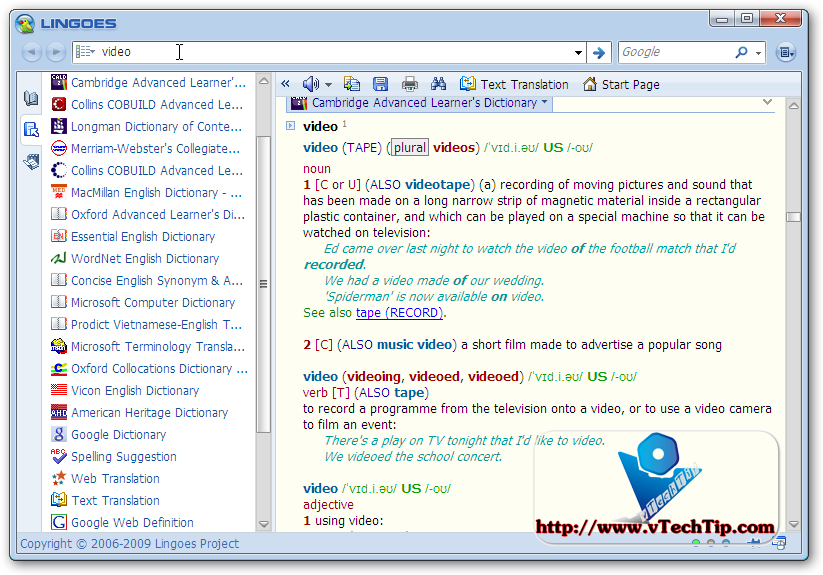
It offers full text translation, capture word on screen, translate selected text and pronouncing text, and abundant free dictionaries as a new gerenation dictionary and translation software. Lingoes offers users the instantest way to look up dictionaries and translation among English, French, German, Spanish, Italian, Russian, Chinese, Japanese, Korean, Swedish, Thai, Turkish, Vietnamese, Greek, Polish, Arabic, Hebrew and more over 80 languages. With the creative cursor translator, Lingoes automatically recognizes the word and its definition as soon as you move the cursor and point to any text, then press hotkey. It wouldn't disturb your current work. Lingoes owns full features of current popular commercial software, and creatively develop cross language design and open dictionaries management. A plenty of dictionaries and thesauruses are listed for free download. Lingoes is the best tool for learning all kinds of languages.
With me, one of the best function of Lingoes is you can add and remove various of dictionaries from Lingoes server. Just download and install, and you can manage these dictionnaries easily. With Dictionary collection of vTechTip, you don't need to download and install anything, just download, unpack and use with ton of the most famous dictionaries, including: - Cambridge Advanced Learner Dictionary - Longman Dictionary of COntemporary English - MacMillan-Webster's Dictionary - American - Oxford dictionary of Law - Oxford Advanced Learner Dicitnary - Essential Englist Dictionary - Wordnet English Dictionary - Collin Cobuild English Grammar - Microsoft Computer Dictionary - English Slang Dictionary - Longman Language Activator - Microsoft Terminalogy Translation - And some of Online Dicrectiories And much more!
But I don't know why some of these dictionaries can not available for download from Lingoes sever anymore! But in this collection, you can use it without doubt of download and price, just FREE ang legal.
After download and extract, you will get a "dict" directory. To add these dictionaries to Lingoes, just copy "dict" directory to \Lingoes\Translator2\dict to another place (for backuping), and then replace new "dict" to old "dict" directory. To update Lingoes to new version, first you need to download Lingoes, and then replace "dict" directory to new Lingoes. Video Tutorials:
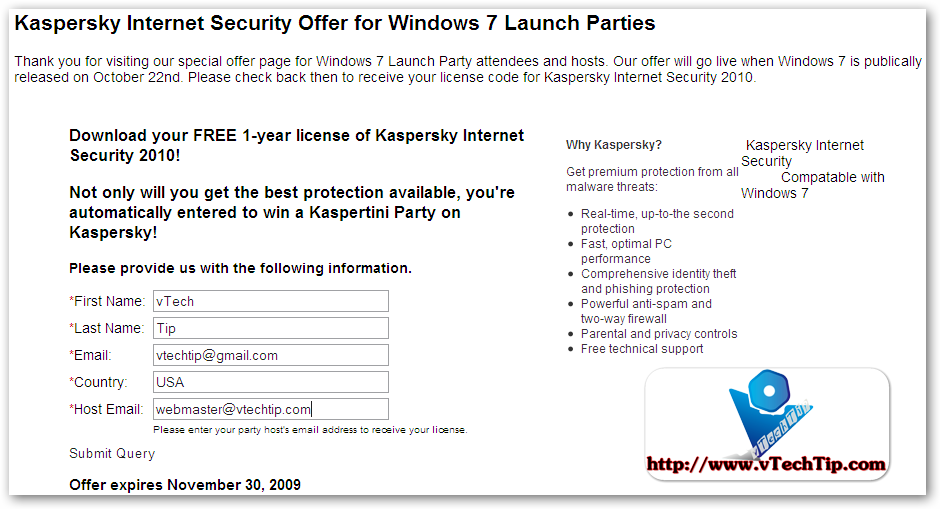
As you know, The Windows 7 launch is October 22, 2009. You’re making an investment in updating your operating system, this says some things about you: you’re smart, computer savvy and interested in staying up-to-date. But due to your recent purchase, your wallet might consequently be a little lighter, too. ON 22 Oct 2009, You can download and use Kaspersky Internet Security and Panda Internet Security 1 year for FREE! With Kaspersky Internet Security: http://usa.kaspersky.com/shakeitup/
Thank you for visiting our special offer page for Windows 7 Launch Party attendees and hosts. Our offer will go live when Windows 7 is publically released on October 22nd. Please check back then to receive your license code for Kaspersky Internet Security 2010.
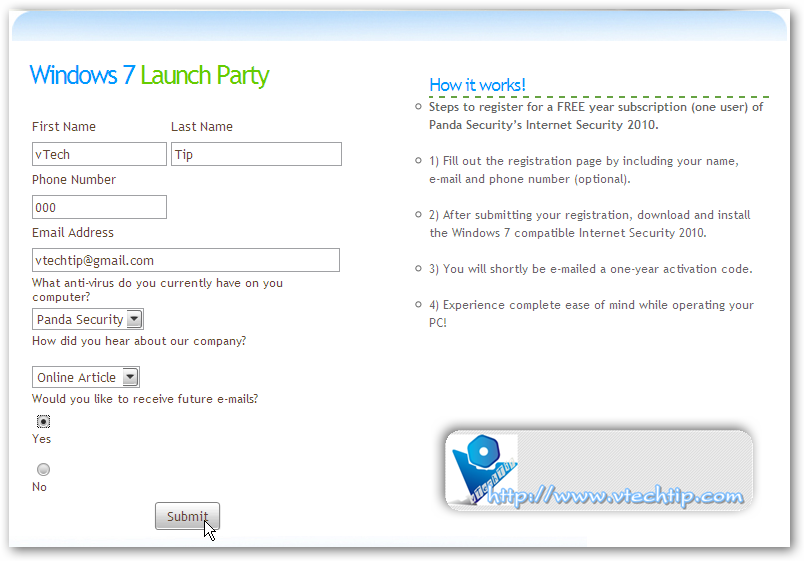
Not to worry! Everyone remotely related to the tech industry is taking advantage of this marketable launch party by giving away free stuff. Not that we can blame them—we are too. But our stuff is free-er than free: Panda Security is the free-er-est of them all. October 22, 2009 is the magical 24 hour period when ordinarily pricey things turn into free things. Well, Panda Security is now compatible with Windows 7, so why not pair the two? Register on this glorious day for ONE FREE YEAR of Panda Security’s anti-virus protection. Prevent viruses, malware, Trojans, worms, identity theft, online banking and other threats from infecting your PC. Internet Security is ultra light-weight because it’s using “cloud” technology so it won’t hinder your computer from operating as freely as it can. Because the only free thing we can think of that isn’t good is a computer virus. Follow these easy steps to free your computer of viruses, hackers and other cyber-criminals: 1) Register here on 10/22/09 2) Download Internet Security 2010 from our Web site 3) Receive an activation code for one free year and use it 4) Run Internet Security and instantly begin protecting your PC from all the cyber junk that will make fixing your computer the opposite of free! What makes Panda the Free-er-est of them all? Free is good. Free is what the people crave. It’s been a proven fact that free-er things are even better than free things because they have reached an elevated level of cost-lacking. Some free-er things have greatly helped the progress of the world and the general well-being of humankind, such as Panda Security’s Internet Security. It frees your computer of viruses, hackers, worms, Trojans, phishing, identity theft and online banking fraud and offers 2 GB of free online space to back up files. Internet Security also offers a Parental Control so that children are not exposed to harmful Web content. Automatic updates, instant protection, easy management; you can’t get any free-er than that. And Panda Security it simply the free-er-est. For instance, some notable free-er things:
Free T-shirts – though we really don’t need or want them, we can never turn them down. Statue of Liberty – free-er because it came from the French. Freebird – no explanation required for this display of musical genius. Free Drinks – best when coupled with limited implications. Free Parking – city slickers understand how much free-er this rare treat is than cabbing it. Get Out of Jail Free – would be free-er if applicable to modern day society, but oh well. Freedom Fries- because of the haphazard attempt at rebranding a carb-loaded snack that we were all fine with in the first place and the ensuing hilarity of the attempt. Freedom of Speech – without which, would we have this awesome promotion? I think not. Free refills – The people need what the people want, and that want is drinking more liquids. Free Range Chicken and Beef – Because animals have rights too. Sugar-free- Because diabetes affects millions of people.
UPDATE: PANDA INTERNET SECURITY NOW LAUCH! Image: Note: this offer is only valid to U.S. residents only. But you can use proxy to get it. Exp: use Hide My Ass service.
Few days ago, Paragon Software Group gave away Paragon Partition Manager 9.5 Professtional for free. Though this Paragon's give away only available on 14 Oct 2009 to 18 Oct 2009, but you can still download and use it today and maybe some next days. Of course download links did not appear in give away site from yesterday, but you can download with these link (from server of Paragon Software Group), about more than 100 MB:
You can try to download from Adrive server if files are not stored in Paragon server longer. And I think you can still use it for free.
And then register Free Serial key at here. You will receive license information for the software within the next 15 minutes from eservice@paragon-software.com. If you do not receive a confirmation email from us, please check your spam, bulk or junk mail folders. If you find the email there, your ISP or your own software spam-blocker or filters are diverting our e-mail. Or you can try to use my key:
PRODUCT KEY: pm95pro-free-1547273 SERIAL NUMBER: 07120-F0590-8FD14-57CC5
Main funtions of Paragon Partition Manager:
Advanced Partitioning Operations
Enlarge NTFS partitions without rebooting Windows or interrupting your work, repartition hard disks without data loss, redistribute free space between partitions, merge two partitions to one etc.
Manage Vista/XP or Vista/Windows 7 on one PC!
Run several versions of Windows on your computer and switch between them easily upon startup. The Install New OS Wizard helps you to set up multiple operating systems on the same disk, e. g. Windows Vista and the new Windows 7.
Apple® BootCamp Support
Redistribute unused space between Mac® OS X and Windows partitions.
Recovery environment on a USB flash drive
Create WinPE/Linux/DOS bootable media on a USB flash drive for fast, reliable maintenance and recovery operations.
Improved two level user interface
A refined user interface with two experience levels (Easy/Advanced) will satisfy the needs of every customer.
Bulletproof protection against hardware malfunction
Safe defragmentation of your hard disks even in the case of power outages, hardware malfunctions or system failures, easy backup creation and recovery media ensure the safety of your computer system.
Optimization and Defragmentation
Tune your system for maximum performance! Defragmentation is the best method for achieving fast and smooth system performance. It accelerates system startup and when launching programs. Keep your system performing like when it was first installed!
Simple System Backups and Restoration
Fast and easy backup creation to CDs, DVDs and even Blu-ray discs with the Simple Backup Wizard. Back up your system and data safely and easily before performing critical partitioning operations. With the help of the Recovery CD you can use Partition Manager to access your files even when your machine cannot boot. Restore your system and data from previously created backup archives when your system fails.
Up-to-date, Paragon Partition Manager is version 10 now. If you want to try newest version, you can read more informations at here. Price of it is $79.95. Personal version is sold with $39.95.
TrueTransparency is so easy to use, just start it and enjoy! It uses a small of RAM, only about 1 - 5 MB or event less.
This True Transparency of vTechTip was included total 30 skins from over network. You can change by right-click at system tray icon and choose Skins > Skin name.
In this 1.2 version, you can use AeroSnap and AeroShake of Windows in currently version of Windows (including XP and Vista). To know how these 2 funtions work, just see video. Video Tutorials:
The software product, codenamed "Morro" after a beach in Sao Paulo, Brazil, is already being tested by Microsoft employees and a trial version will be made available in September according to sources familiar with Microsoft's plans. Microsoft has officially stated that Microsoft Security Essentials would be available by the end of 2009 at the latest. The company has been trialing internal versions since June 1.
This is basically an alpha of the upcoming free Microsoft antivirus. 3 installers are included. XP, Vista and 7 x86 and Vista and 7 x64. Please look at the file name to determine which one to install.
Screenshot:
- Installation Screen:
You must validate your Windows version online to install this software.
- Main screen, Home Tab: - Main screen, Update tab: First Microsoft Security Essentials will update online database.
antialiasing (3 levels: off / method 1 / method 2)
256 levels of transparency with special mouse-over transparency function
changable and configurable styles (24 PNGs and 7 BMPs in standard installation, additional 98 PNGs and 69 BMPs available in full instalation or in PNG/BMP packs)
per-pixel alphablending for PNG backgrounds
advanced window options (unmovable, always on top, pin to desktop, click through, ...)
priority settings
configurable alarms with ability to show alarm window, play sound, execute application and shutdown computer
simple calendar
automatic start with Windows (for all users) or with user login (only for your user)
language support (Arabic, Bulgarian, Chinese, Czech, Dutch, English, Finnish, French, German, Hebrew, Italian, Japanese, Polish, Portuguese, Russian, Serbian, Slovak, Spanish, Swedish, Turkish and more)
absolutely free software - it contains no ads, no spyware, no adware and no toolbars
Every XP users always love Vista interface such as sidebars and widgets, but they don't have to buy, install or upgrade their desktops.Because now I will introduce you 10 best gadgets for you to run someWindows Vista features in XP.
1.WindowsExplorer: browse files and folders withWindows Vista Explorer interface.
2.InternetExplore 7.0: You can use this file tobrowse the web with seven balls interface as in Vista, with only 1Address bar to enter web address and 2 buttons Next, Back.
3.Photo Gallery: Simple tool to view photos,streamlined, lightweight but extremely eye-catching. You click on SelectFolder button to browse to the folder containing the photos,then use Previous Image button (back to the front)and Next Image (to the next) to see image. If youdo not want to browse image by yourself, you can waiting for a programautomatically switch to the next image in every 20 seconds.
4.System: the information of computer systems. Bydefault you'll see information as the computer is using Windows VistaUltimate, and other information about the hardware is correct. Inaddition, the left interface is a set of system functions of WindowsXP. You simply choose to review and refine (if you understand thechoices inside).
5.Trash Bin: A Vista recycle bin. You can keep yourmouse clicks on the icon left the trash and pulled away any place inany place where on the desktop.
6.Vista Clock: Take the contract of households areon the Vista desktop. It is a clock with a second needle move back willcreate continuity for your desktop more lively. In addition, you canalso click the left mouse on it to open the Date and Time Properties(editing system date and time)
7.Vista HDD Information: A tool on the desktop foryou to track information for the computer hard drive.
9.Welcome Center:Welcome center of Vista for XP.Use it tho browse files, folder or search.
10.Windows Media Player: A small and eye-catchingtool of the Windows Media Player on your desktop. After activating theenforcement then you continue to click on Open Folder to browse searchdirectory for the music, then click the Play button to hear or use theother tools, such as when using Windows Media Player in Windows.
You've justread the post, and what's next? Best Gadgets of Windows 7 for Windows XP, keep looking for my posts.